

When you get an email from a person, you have the option to add the email address to your Outlook contacts and this option is provided y default. Gwabbit is a nice add-in for Outlook which makes contact management easy. Every time there is an email from a person who is not in the contacts list, the add-in prompts for adding them to contacts and more than that, it fetches the contact details from the signature and then adds it automatically.
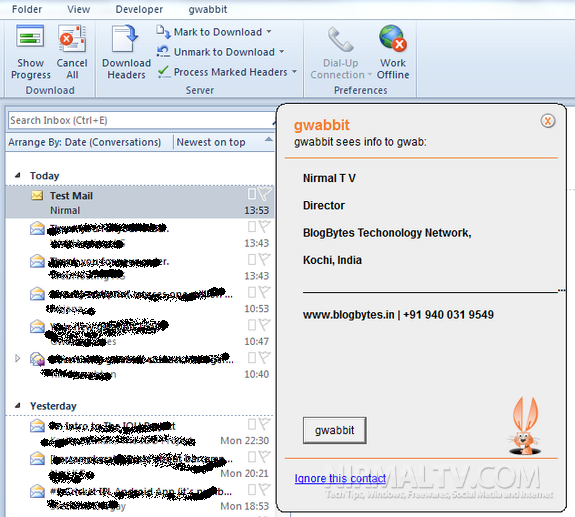
Once installed, it add itself into the add-in tab and you can access Gwabbit. As you can see from the screenshot above, the add-in prompts to add the contact automatically and it fetches the details from the signature. In case the signature is mixed up and not recognizable, it asks you to pick the signature manually. Once the contact details are filled, you can save it to Outlook contacts.
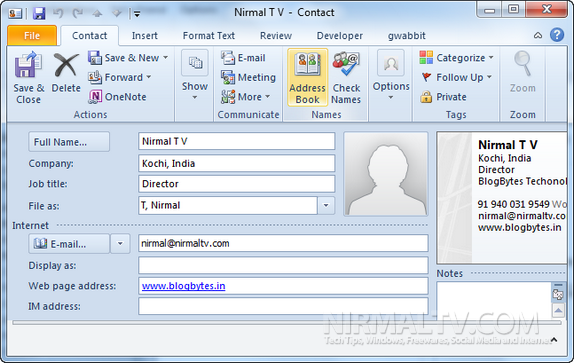
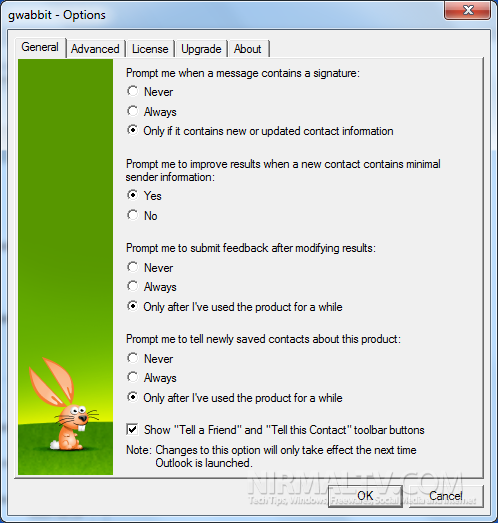
gwabbit employs a remarkable patent-pending semantic technology to identify contact blocks within email text and accurately parse and import them into your address book. No more cutting and pasting contacts one field at a time from your emails into your address book. You can set the options from the Outlook 2010 add-in bar.
Gwabbit works with Microsoft Outlook 2010 (32- and 64-bit), 2007, 2003, 2002 (Office XP) and 2000. Gwabbit is an excellent add-in for Outlook and the way it fetches the details of the contact makes it very much useful. Having said that Gwabbit is not free, the Outlook version costs around $19.95 and you can try the add-in for 14 days before purchasing. If you liked the add-in and want to win a free license, we are providing 5 license to readers. You can download the trial copy here.
How to Win a free license:
Comment on this post mentioning which version of Outlook do you use and your Windows OS along with a valid email ID. We will pick 5 random winners from the comments.
Update: Contest is closed and winner announced. Winners are azziz07, Pramod, Toolski, vaibhav srivastava and mark. Winners will receive a mail with license details.




Hii,
Thanks for this nice giveaway. Kindly count me in for this.
OS: windows 7 x32 and outlook 2010.
Thanks in advance
Like the name and the functionality :). I’m on Outlook 2007, Windows 7 Enterprise.
Thanks Nirmal.
I use MS Outlook 2010 and OS is W7 Pro 64-bit.
Appreciate if u could count me in.
Thanks, Grr
Hi Nirmal, I’m using Outlook 2010 on my Win7 Ultimate x64 Desktop computer, an I wanna win a license…
Handy tool, thanks. Windows 7 32bits, Outloock 2007
Hi, I’m using Outlook 2007 with Windows XP. Please count me in.
Thanks
I use outlook 2007 on windows 7 32bits, thanks for this contest.
Outlook 2010 with Win7. Hope to be in luck.
Count me in, i really need it!
Thanks 🙂
Thanks for the giveaway.
I use Outlook 2007 and Windows XP.
Thank you for the giveaway! Great addon for my Office 2010 to organize my contacts. I’m using Windows 7 pro 32x.
http://twitter.com/#!/vj_onix/status/60947393415364608
Nice application,count me in.I use Outlook 2007, Windows 7 Home Premium
Thanks for this contest, outlook 2003 windows vista
Thanks Nirmal for the giveaway.
OS; Win XP 32 bit
Outlook 2010
Count me in… already shared under my twitter
https://twitter.com/#!/vibhusri/status/61305962199384064
I use outlook 2007 and WinXP on my computer,Thanks for the giveaway,luck to all,!
I’m using Outlook 2007 with Windows XP.
Count me in too please.
I use Outlook 2007 and Windows 7… love the idea of this!
I won… now I am waiting for my license…
thanks Nirmal
hii
I received my license and it does a great job.
Thanks Nirmal and hope we will get nice giveaways in the future too.
Hi,
This is Sanjay. I use MS Oulook 2007 on win7.
It is really a great concept.
PLEASE PICK ME! I have the application installed on my Blackberry and would love to have it on my laptop as well. It has made my lie so much easier especially with the amount of emails I receive daily.
Look forward to hearing from you and possibly a FREE license too. 🙂
I am using Outlook 2010 on Windows 7 32bit OS
Kind regards,
Christl
I use Outlook 2010 on Windows 7.
looking forward to use your application.
Regards,
alex
Hi, I’m using Outlook 2007 with Windows 7. Please count me in.
Thanks