

Many times when we receive emails we might have noticed that it is in plain text format and this happens mostly when emails are send from contact forms online. When you try to reply to these emails, you might have noticed that the email messages continue to be in plain text format. The disadvantage for plain text format is that you cannot add any images or formatting to text as these options are disabled in Outlook 2010. But you can convert these emails to HTML format from Outlook 2010.
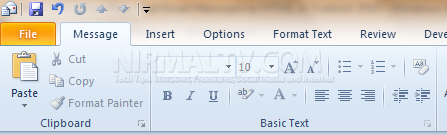
When you receive a plain text message, you can see many functions in ribbon are disabled.
To enable these options and to convert the message into HTML format, click on the Format text tab in the ribbon. Under the sub group Format, click on HTML to convert the message into HTML format.
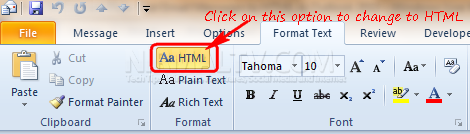
Once you convert to HTML format, you can see other options getting enabled. If you try to convert an HTML message to plain text format, you might lose the formatting in the current email. Converting a message to HTML format has the advantage that you can add images, clip arts and other charts to email messages.




My Outlook does not show all of these options on the ribbon. I just have file,message and add-ins. When I try to add the “Format text” tab to the ribbon from the “Customize the ribbon” option, and click OK, nothing changes.
isn’t this option only available when creating new messages?
Fail
I have a newer version of Outlook 2010 after an OS Crash. The older version allowed me to toggle between HTML, RTF and plain text but I find no such option anywhere and have even tried to Customize the Ribbon to no avail. ANY HELP AVAILABLE???
This option is available for existing emails as well, you just have to press the edit button first.
I do not see this option? Where to find this. Is it for outlook 2010?
Excellent article. I absolutely appreciate this site.
Thanks!
I got it! One has to detach the message first, and then go to the tab “Format text”!