

When we browse the Internet we find different websites having different fonts, some of them are fancy while other are professional. When we like a font, often we want to implement in on our blogs/websites, but how do we know the font and its size? Although you can open the CSS style sheet of the website and find out the font, it might be a tedious task for people not familiar with CSS formats. Here is a Firefox Add-on which does this job easily.
Context Font is a simple and straight forward extension which helps you to find the font and its size right inside the Firefox context menu.
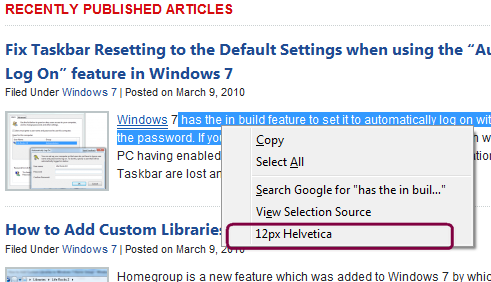
Once installed, if you want to get the font of any website, just select some sample text from the website and right click from Firefox. The add-on shows the font size and also the font quickly and easily.
Context Font is probably the best way to get the size and font-family of selected text in the context menu. This add-on should be very useful for web designers to get the fonts on websites.





I would like to suggest that you use the site http://www.findthatfile.com to find fonts! I think its the best site I have used yet.