Long back we had written an article on how to backup bookmarks using the profile folder of Firefox. Now with the release of Firefox 3.6, it is much more easier to back up bookmarks as well as your profile folder in case you want to reinstall Firefox or migrate it to another PC. Firefox 3.6 has a new feature called about:support which provides you with information like your current profile location, exact Firefox version, links to plugins and build configuration details and a list of all your current extensions.

You can open the support page by either enter about:support in the URL or opening Help menu->Troubleshooting Information. This opens a support page with all the details.
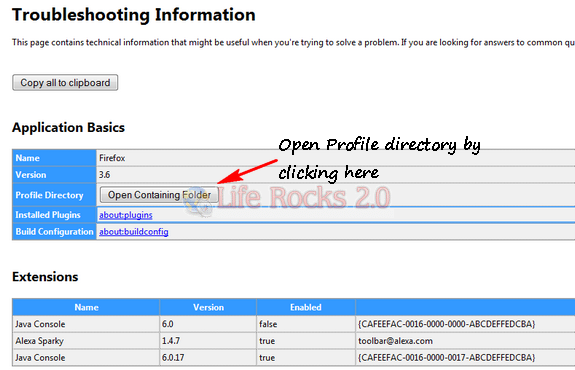
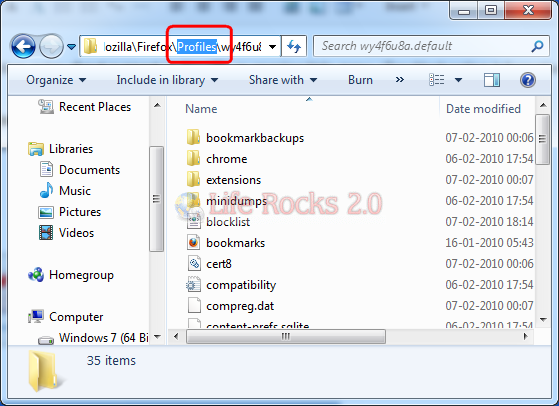
This opens up the profile folder where you can backup your settings or the folder as a whole.
For more Firefox related articles click here.

Pingback: Quickly Backup Your Firefox Profile With about:support | Lifehacker Australia
Pingback: Quickly Backup Your Firefox Profile with about:support [Firefox Tip] | Phatboi's Blog-Roll
Pingback: Quickly Backup Your Firefox Profile with about:support [Firefox Tip] | Blog SDN
Pingback: Quickly Backup Your Firefox Profile with about:support [Firefox Tip] | Son Of Byte
Pingback: Quickly Backup Your Firefox Profile with about:support [Firefox Tip] | Computer Tips and Tricks
Pingback: Quickly Backup Your Firefox Profile with about:support [Firefox Tip]
Pingback: Quickly Backup Your Firefox Profile with about:support [Firefox Tip] | wwwhat's new?
Pingback: Quickly Backup Your Firefox Profile with about:support [Firefox Tip] « The BAT Channel
Pingback: Quickly Backup Your Firefox Profile with about:support [Firefox Tip] « AccessTech News
Pingback: Quickly Back Up Your Firefox Profile with about:support [Firefox Tip] | Computer Tips and Tricks
Pingback: Quickly Back Up Your Firefox Profile with about:support [Firefox Tip] | Blog SDN
Pingback: Quickly Back Up Your Firefox Profile with about:support [Firefox Tip]
Pingback: Links 11/2/2010: LinuxQuestions.org Awards, Myst Online Set Free | Boycott Novell
Pingback: Export/Import or Backup your Firefox Profile
Pingback: Respalda Firefox con about:support - TechTear
Pingback: Respalda Firefox con about:support