

Outlook 2010 is the upcoming version of Outlook with some great features which we have covered previously. Another improvement in Outlook 2010 is the way you can search mails and attachments in Outlook. Outlook 2010 has a ribbon tab for with some great search tools which helps you to search mails, attachments in Outlook when compared to previous versions. The search tools tab is enabled as soon as you click on the search box above the mails.
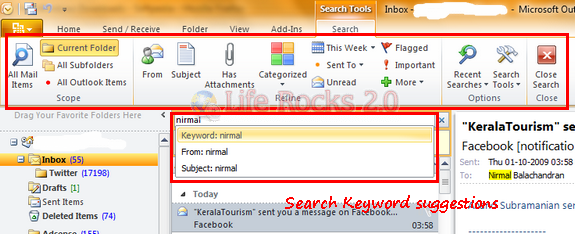
As you can see from the image, the search tools contain lost of options. You can either search the current folder, all sub folders or all Outlook items. In the search refine tools, you can refine your search with from, subject or mails having attachments, mails categorized, flagged, send to etc.
Outlook 2010 provides you with search keyword suggestions as son as you start tying any search term. You can narrow down your search using the keywords.
The two new features that comes with Outlook 2010 search are the Search Contextual Tab in the Ribbon and the Search Suggestion List. You can customize the search options using the Outlook Search Options which can be opened from the search tools.
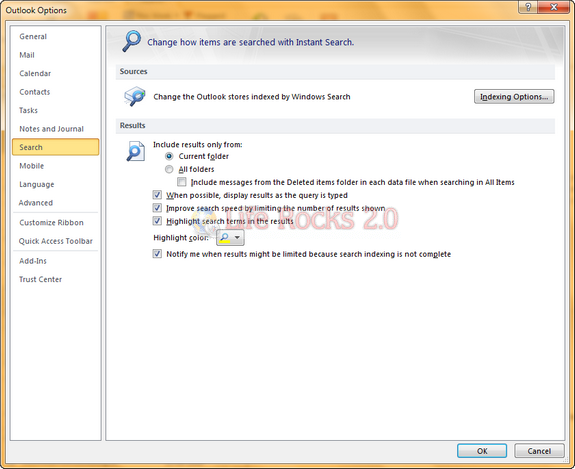
Below you can see the screenshot of Search in Outlook 2007 with limited options for searching in emails:
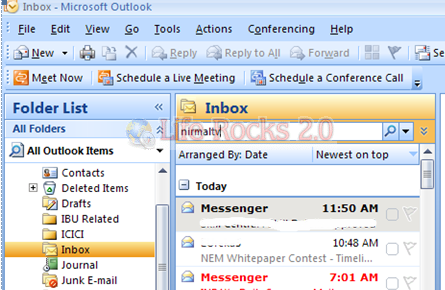
Overall Outlook 2010 is a power house of new features and will definitely change the way emails are being handled.




Searching in Outlook 2007 was horrible because of the few options you had. Because of that I started to use a third-party search tool (www.lookeen.net) which worked perfectly well for me, well enough to use it also with Outlook 2010. There are some problems with lookeen and the beta-version of Outlook 2010 but the final version of Outlook will work with it, so I am rather looking forward to other improvements of the new Office 2010
I tried getMail from http://www.searchterrain.com.
Uncomplicated and fast.
This ‘Ribbon’ concept really sucks! It’s just like with the Vista system; designed to take 2 or 3 times to do what it used to. I think that Microsoft hired a load of cretins off the street and just let them loose on Windows. What a mixed up confusing mess!!!!! I suppose we’ll all end up having to pay through the nose to buy Windows 8 which will come with all the original menus back the way they were? What a con!!!!