Grab Them All is a Firefox Add-on which can take a screen capture of all URLs specified in one click. This add-on is based on Screengrab with the difference that Grab Them All takes screenshot of all specified URLs with one click. Screenshots are saved in *.jpg or *.png files in specified directory. The URLs for screen capture need to be specified starting with http in a specified text file.
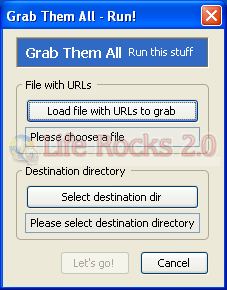
Once installed you need to specify the file to load the URLs and also the destination directory where all the screen captures are saved. This is useful if you want to get the screenshots of multiple websites. You can configure all the websites in the file and it captures in the background.
You can activate the screen capture from the button in the toolbar.

Grab Them All opens new window load there each site URL and take screenshot. To configure Grab Them All select Tools-> Extensions-> Grab Them All-> Preferences. Here you can set the image format, Window size, screenshot type etc.