

iRinger is a freeware application which can create ringtones for iPhones from virtually any music or video file you own. It can even create ringtones from Youtube videos. Once the ring tone is created, iRinger exports ringtones to iTunes, so there is no need to jailbreak your iPhone to transfer it.
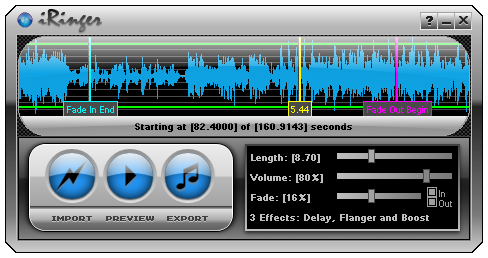
This application allows you to create ringtones in 3 easy steps, import the music file which you want to convert to ringtone, then preview it in iRinger and finally export it to use it as ringtone. Another good thing for this application is that it also supports iPhone 3G.
It runs on all versions of Microsoft Windows including Windows Vista and requires iPhone firmware 1.1.2 or newer, iTunes software 7.5 or newer. The website provides different tutorials on how to use the advanced feature of this application to create ringtone.
Feature of iRinger;
- Convert virtually any audio format into an iPhone ringtone
- Extracts audio out of video
- Choose which section of the audio you want to hear
- Adjust ringtone length, volume, fade in, fade out and loop gap
- Export to iPhone ringtone format and import right into iTunes
- Export to iPhone using SCP/SFTP and skip using iTunes
- Use audio effects: Delay, Flanger, Boost, Reverse








Thanks for the heads up on this. I will be writing about this shortly and linking to you. 🙂
Get tons of free ready made iPhone ringtones. Just download to your computer, and drag into itunes ‘Ringtones’ folder:
http://www.free-ringtones.cc
Go check out the website Meaghan talked about…..so cool.
thi s is cool application. i liked it very much, simple to use especially for custom songs to make as ring tones. Thankyou very much.
!WOW! is very simple
Really cool application.
http://ringfree.servegame.com super site pour les sonnerie et d’autre truc pour l’iphone 3G et autre portables 3G. 100%gratuit
where do you find the ringtone on your iphone
thanks !! man …it’s cute
Nirmal… Thanks a lot. I will be trying this soon. Great that you took time to do this. Great for non techies like me.
how do this work cos i’ve tried using. still confuse i need personal assitance
Great app Nirmal… It was really 1-2-3 and the tone is ready !!! Thanks a lot..
Found another cool site to make iPhone Ringtones from mp3s
http://iphone.angarka.ru
This is a very useful tool and its easy to use Thank you very much. But do you know of an app to convert music to a TEXT MESSAGE TONE.
I prefer use Ringbuilder, an funny app available on the AppStore (http://itunes.apple.com/us/app/ringbuilder-creating-custom/id388838108?mt=8) You can create and share your own ringtones directly on iPhone ! It’s so cool use this app’, I recommend to all !
I try Ringbuilder recently and it’s really nice with the BUMP you can share your ringtones with your friend, so cool !
ther are lots of free ringtone sites on the internet if you just keep on searching on google’`.
most of the best ringtone sites are pay sites, does anyone know of a good free ringtone site? “‘-