
Techniqued- Technoloy, Review and Tutorials
  • Android
  • Freewares
  • Tutorial
  • Windows 11
  • macOS
No Result
View All Result
Techniqued- Technoloy, Review and Tutorials
  • Android
  • Freewares
  • Tutorial
  • Windows 11
  • macOS
No Result
View All Result
Techniqued- Technoloy, Review and Tutorials
No Result
View All Result

Sync and Backup Content from Social Networks with Social Folders

Nirmal by Nirmal
November 19, 2011
in Freewares
4
Share on FacebookShare on Twitter

Social Folders is a nice freeware app for Windows which lets you back up and sync files from multiple social networking site. In short you can call it as the Dropbox of social networks. You need to sign up for their service and then access and backup your social networks data right inside your PC. SocialFolders support includes Flickr, Box, Facebook, Instagram, Picasa, Photobucket, YouTube and Google Docs and more might come in the future versions. You need to authorize social folders to access these websites. With Social Folders, you get real two-way sync, allowing you to not only back up, but to also upload files to your online accounts.
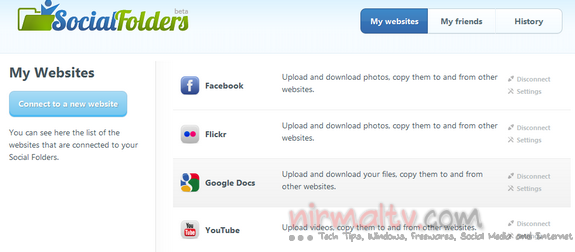
Connect Website

Your online dashboard allows you to connect to multiple websites listed and you can tell Social Folders to selectively sync folders and files. Once you have authorized the services, you can open Social Folders on your desktop. You can view all the websites you have authorized and synced right inside Windows Explorer.
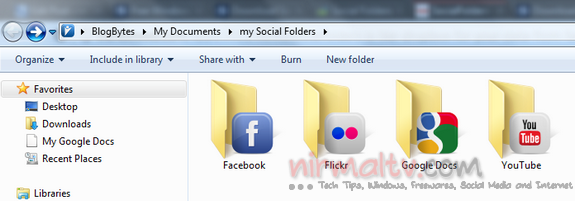
Social folders

If you make any changes to the files in this folder, like add new files or remove them, you can easily do a two way sync. This also means that if you want to upload a new album to social networks, just add it to social folders and sync it. You can also refresh your folders from the system tray option.
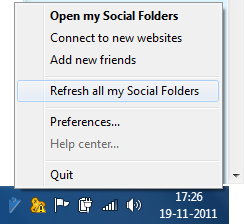
Refresh folders

The app will check for any new files available automatically every day, so all you need to do is to add files to the respective folders which represent the network. You don’t have to use the browser any more to upload photos and files to these services.

You can watch this video of Social Folders in action;

Social Folders is available for both Windows and Mac.

Social Folders is a nice implementation of two way sync of your social networking files from your desktop without having to use the desktop.


Download Social Folders

Tags: BackupFreewaresSocial FoldersSocial NetworkSync FilesWindows
ShareTweetSendSend
Previous Post

How to Find Windows 7 Licensing Information and Rearm Count

Next Post

Check your Website Speed and Load Time using Google Analytics

Related Posts

Freewares

Completely Uninstall any app from macOS using AppCleaner

December 17, 2022
Freewares

How to Check your Mac’s CPU Temperature

December 13, 2022
Freewares

How to Block Pop-up windows in apps in Windows 11

December 6, 2022
Freewares

How to Monitor Programs Auto-Starting in Windows 11

November 23, 2022
Freewares

7 Best Music Players for Windows 11

November 14, 2022
Featured

7 Best Free Antivirus for Windows 11

November 10, 2022

Leave a Reply Cancel reply

Your email address will not be published. Required fields are marked *

This site uses Akismet to reduce spam. Learn how your comment data is processed.


Latest Articles

How to Use Emojis in Windows 11 with Keyboard Shortcut

How to Fix “Operation Failed With Error 0x0000011B” in Windows

7 Best Android Emulators for Windows 11

How to Use Two WhatsApp Accounts on an iPhone

How to Find BitLocker Recovery Key

10 Best Free Online Video Editors [2023]

Techniqued- Technoloy, Review and Tutorials

© 2021 Techniqued - Technology, Tips, Tricks and Reviews

Navigate Site

  • About Us
  • Advertise with us
  • Contact Us
  • Copyright Policy
  • Disclaimer

Follow Us

No Result
View All Result
  • Android
  • Freewares
  • Tutorial
  • Windows 11
  • macOS

© 2021 Techniqued - Technology, Tips, Tricks and Reviews

This website uses cookies. By continuing to use this website you are giving consent to cookies being used. Visit our Privacy and Cookie Policy.




