
Techniqued- Technoloy, Review and Tutorials
  • Android
  • Freewares
  • Tutorial
  • Windows 11
  • macOS
No Result
View All Result
Techniqued- Technoloy, Review and Tutorials
  • Android
  • Freewares
  • Tutorial
  • Windows 11
  • macOS
No Result
View All Result
Techniqued- Technoloy, Review and Tutorials
No Result
View All Result

Import and Export Windows Live Writer Settings

Nirmal by Nirmal
March 1, 2011
in Freewares
4
Share on FacebookShare on Twitter

If you are using Windows Live Writer to compose posts to your blog, then you might have heard about Windows Live Writer Backup tool. Here is another Windows Live Writer Plugin which will help you to import and export Windows Live Writer settings. The tool allows you to export chosen settings from Writer to external file and/or even on FTP folder. So when you import settings on another PC you can access this data easily and then import it instead of having to configure it again.
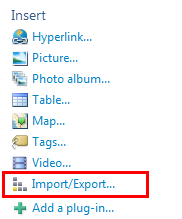
Import Export

Once you install the plugin or add the dll to the plugins folder, the tool shows up a link under the insert options in the WLW sidebar (make sure you restart WLW after installation). When you click the Import/Export wizard will open and you can select the settings you wish to export. This tool can be used to back up WLW settings as well.
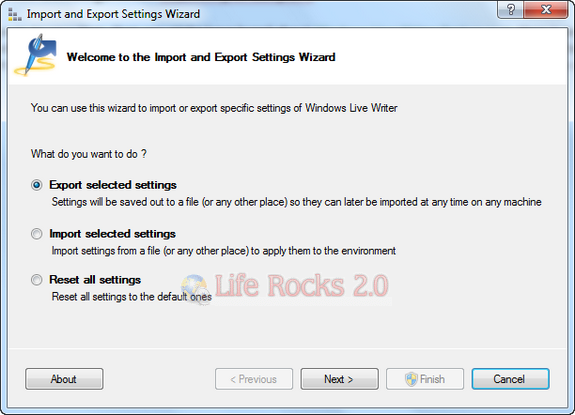
Import Export Wizard

You need to select the settings and the blogs which you want to export.
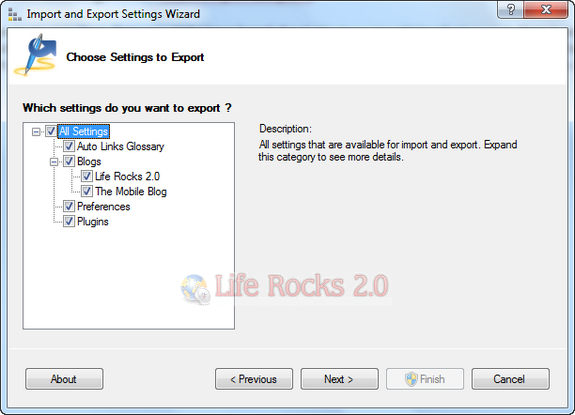
Settings

Once the settings are selected, you can save the back up to any location on your PC or even upload it to FTP server.
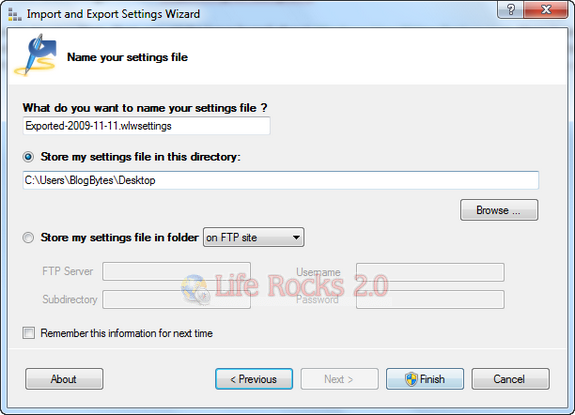
Finish Import

Main features

  • Export/Import configuration settings
    • Auto links glossary
    • Preferences
    • Blogs – blog accounts configured for current user
    • Plug-ins – all plug-ins installed on current PC
  • Saving settings in
    • local folder
    • network folder
    • folder on FTP

You can either download the Setup or the Dll File. [Via

]
Tags: FreewaresImport Export WLWPluginWindows Live Writer
ShareTweetSendSend
Previous Post

Virtual Router Manager turns Windows 7 into a WiFi Hot Spot

Next Post

Extract Clips from your DVD with DVD Knife

Related Posts

Freewares

10 Best Minecraft Mods You Should Download

April 19, 2023
Freewares

How to Password Protect Folders in Windows 11

March 15, 2023
Freewares

3 Best Free Video Editors for YouTube [2023]

January 20, 2023
Freewares

Completely Uninstall any app from macOS using AppCleaner

December 17, 2022
Freewares

How to Check your Mac’s CPU Temperature

December 13, 2022
Freewares

How to Block Pop-up windows in apps in Windows 11

December 6, 2022

Comments 4

  1. Jal says:
    14 years ago

    Exactly what I needed. Thanks. Dugged this article!

    Reply
  2. Tony says:
    14 years ago

    A must have plugin-in for Live Writer Snippets Manager

    Reply

Leave a Reply Cancel reply

Your email address will not be published. Required fields are marked *

This site uses Akismet to reduce spam. Learn how your comment data is processed.


Latest Articles

What is Smart App Control and Why is it Disabled on Windows?

How to Fix “Disk not Ejected Properly” Error on macOS

6 Best AI Tools for Better Meetings

How to Fix “This App Has Been Blocked by Your System Administrator” Error in Windows

How to Automatically Upload iPhone Photos to Google Photos

How to Download Photos and Videos from Google Drive to iPhone

Techniqued- Technoloy, Review and Tutorials

© 2021 Techniqued - Technology, Tips, Tricks and Reviews

Navigate Site

  • About Us
  • Advertise with us
  • Contact Us
  • Copyright Policy
  • Disclaimer

Follow Us

No Result
View All Result
  • Android
  • Freewares
  • Tutorial
  • Windows 11
  • macOS

© 2021 Techniqued - Technology, Tips, Tricks and Reviews

This website uses cookies. By continuing to use this website you are giving consent to cookies being used. Visit our Privacy and Cookie Policy.





