

Internet Explorer 9 beta version was released with lots of new features and improvements. One of the major changes is the availability of sites under the about:tabs options. When you open a new tab, you can see your favorite websites shown in 2 rows in the about:tabs homepage. If you are looking to have more websites added to this list, you can increase the number of sites shown in the about:tabs page using a simple registry hack. With this hack you can increase the number of sites to up to 5 rows.
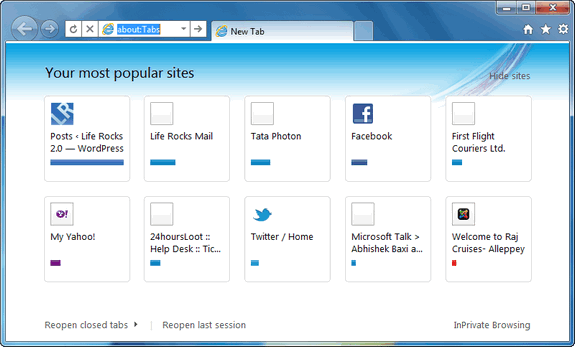
Before registry hack.
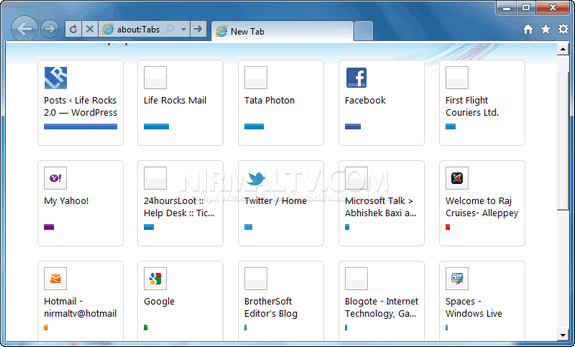
After registry hack
To do this, open Registry Editor (Run-> regedit). In the registry editor, navigate to HKEY_CURRENT_USERSoftwareMicrosoftInternet ExplorerTabbedBrowsingNewTabPage. Under the NewTabPage, right click on the right panel and select New-> DWORD.
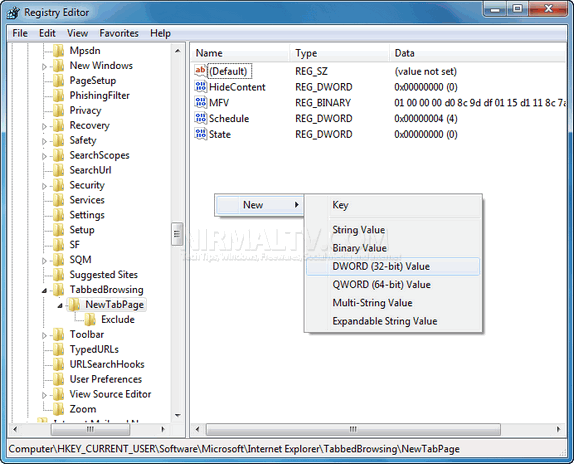
For the new DWORD, enter the Value name as NumRows and enter the value as 5 (if you need 5 rows).
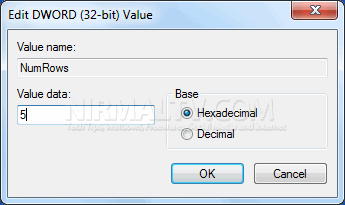
Click ok and close the editor. Now close IE9 and reopen it, you will be able to see the new rows of favorite sites in action. In case you are not comfortable editing the registry, you can download the hacks here.




Makes sure take a backup before you change registry. If something goes wrong with registry you may need to reinstall operating system.