

Whenever you download any files using Firefox browser, the files are available in list form in the downloads section. Although you can open any file by double clicking the file from the download list, Windows default context menu is not available. Downloads Context Menu is a Firefox Add-on which allows users to quickly access the standard Explorer context (right click) menu of finished downloads directly from within Firefox.
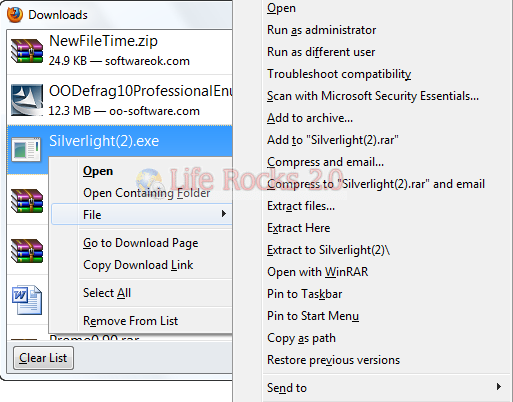
Once the add-on is installed, you can get the context menu for any file in the downloads section. Open the downloads list and right click, you can find an additional File option which provides you with the context menu.
This could be very useful if you have Run as Administrator enabled in right click menu or for extracting files quickly or even to share them using email.




A very good, plugin ., so i Need not right click again in the download folder to see the other options.,
Its really a great plugin..i iwll definately give it a try….