

Previous versions of Windows, including Vista had an option to show the desktop when you have too many windows open. The show desktop feature in previous versions of Windows minimizes all the open programs. In Windows 7 the position of show desktop is different and it has another feature called Aero peek which will actually peek into the desktop without minimizing the applications. But if you want the show desktop feature in Windows 7, here is a small application, called Show Desktop, which will do the same task as in Vista and XP.
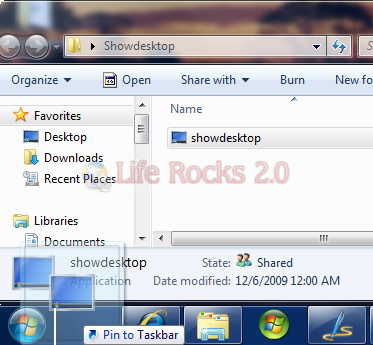
There is no installation for this program and when you execute this, it will actually minimize the application windows and show the desktop. So in order to have the same option through taskbar, simply drag and drop the exe file to the taskbar and pin it to the taskbar.

Now, every time you want to use the show desktop feature, just click on the icon in the taskbar.
Download Show Desktop for Windows 7







…or you could just click the ‘show desktop’ button that comes built-in to Windows 7 and sits to the right of the clock?
Wait, what? There’s already a button that does exactly that. The ‘aeropeek’ option you mention it’s actually called “Show Destop” and it SHOWS THE DESKTOP when clicked.
@James, @Alasdair, @Melecio,
You are right, the aero peek button is actually show desktop. What I meant is people used to show desktop near the start menu in XP and Vista can have the same feature in Windows 7.
James, I was thinking the same thing!