

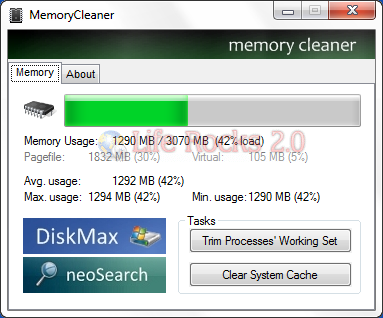
We have covered memory free up freeware tools like RAMRush, FreeMem and MEMORyal. Memory cleaner is another freeware tool to free up Windows 7 memory and also clean up system cache. Unlike other free tools, this application uses the functionalities build inside Windows to clean the system memory, making it more effective. MemoryCleaner is considerably better because it uses functions built into Windows to judiciously free memory – with no performance impact.
Feature List
- Trims processes’ working set.
- Clears system cache.
- Monitors RAM usage and reports minimum, maximum and average (true average, not (min+max)/2).
- Reports Pagefile and virtual memory usage.
It also shows live display of RAM usage and also the pagefile size.







i have used the memory optimizers in the past but they have not provided good results, will try this one though. i feel that increasing the paging file manually would do just great…