

If you have a Windows 7 laptop, you can turn it into a Wi Fi hotspot so that your friends can connect to it. Virtual Wi Fi, one of the features that Microsoft introduced in Windows 7 and Virtual Wi Fi makes it possible to use the wireless networking adapter of a PC running Windows 7 as a wireless hotspot for additional systems. Connectify is a free application, currently in beta which uses the Virtual Wi Fi capabilities of Windows 7. Windows 7 users can use the Connectify to share the Internet connection of their computer system through a secure WPA2 encrypted hotspot.
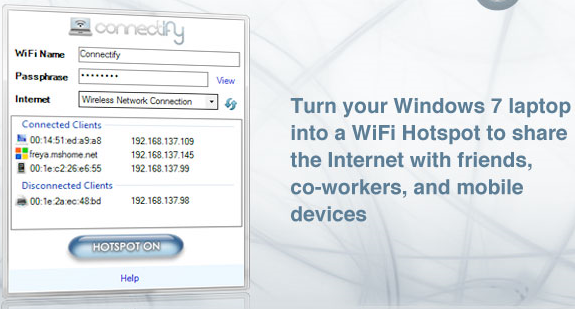
Other devices with wireless capabilities can connect to the hotspot to make use of that connection. Connectify works with new Windows 7 logo-tested Wi Fi devices, and many older devices that have compatible Windows 7 drivers.
To get started, click on the Connectify logo in the Notification Tray.
- Select the Internet connection you wish to share
- Choose a name for your new wireless network
- Choose a wireless passphrase
- Press the Internet Sharing button to turn on your wireless network
- Now, from your other devices, you can see your wireless network. Choose to join it, and enter the wireless passphrase to connect.







Thanks for writing about Connectify. We thought you may want to know that Connectify 1.0 is now available for free as the first production ready release. Some older wireless cards do not yet have full Windows 7 support, and for those devices Connectify will act as an Ad Hoc connection manager, instead of a full blown Wi-Fi Access Point.
Thank you again for your support.
Try http://wlancontroller.com to turn windows 7 into hotspot