If you looking for having the same look and feel for your document in Word, PowerPoint, Outlook etc, then you should be trying the Office 2007 Theme Builder. Theme Builder tool enables the creation of document themes for Microsoft Office 2007. Document themes provide a quick and easy way to apply a consistent look across all your Microsoft Office documents. You can apply the same theme to PowerPoint presentations, Word documents, Excel spreadsheets, and even Outlook emails.
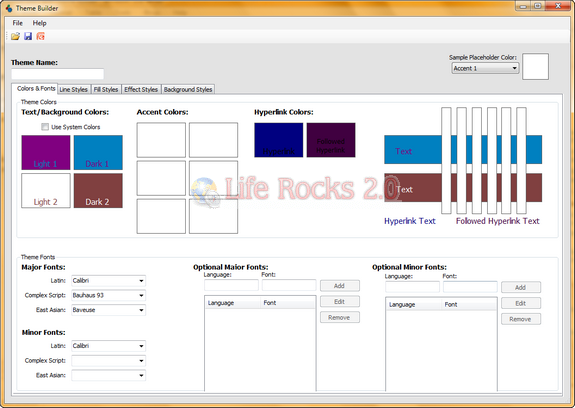
Once you have installed the utility, you can create themes such that you have the same look across Office documents. you can customize every aspect of the theme like texts links, visited links, fonts etc.
The application requires .Net Framework 3.0 (Download) and Office 2007 Primary Interop Assemblies (Download).


[...] 2007 Theme Builder [Microsoft via Life Rocks 2.0] Tagged:microsoft [...]
[...] The application is a bit of a pain to get going, but could be a huge timesaver for making sure all your Office documents have a consistent look. Theme Builder is a free download for Windows only. Office 2007 Theme Builder [Microsoft via Life Rocks 2.0] [...]
[...] The application is a bit of a pain to get going, but could be a huge timesaver for making sure all your Office documents have a consistent look. Theme Builder is a free download for Windows only. Office 2007 Theme Builder [Microsoft via Life Rocks 2.0] [...]
[...] The application is a bit of a pain to get going, but could be a huge timesaver for making sure all your Office documents have a consistent look. Theme Builder is a free download for Windows only. Office 2007 Theme Builder [Microsoft via Life Rocks 2.0] [...]
[...] | Life Rocks 2.0 Sitio Oficial | Theme Builder para Office 2007 Descarga | Theme Builder para Office [...]
[...] | Life Rocks 2.0 Sitio Oficial | Theme Builder para Office 2007 Descarga | Theme Builder para Office [...]
[...] | Life Rocks 2.0 Sitio Oficial | Theme Builder para Office 2007 Descarga | Theme Builder para Office [...]