

Internet Explorer 7 had a feature to open the last browsing session next time (the tabs open), while closing IE. The tabs would be saved and will be opened when you use IE7 next time. But with the release of Internet Explorer 8, this feature is not available when you close multiple tabs which are open in IE8. Even though this feature was removed, IE8 has a new feature where in you can reopen the last browsing session, but the only difference is that the tabs will not be automatically loaded when you open IE8.
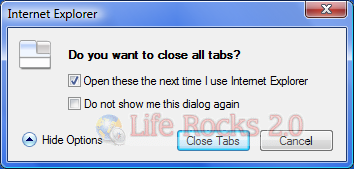
Image: Save the tabs feature in IE7 which was removed in IE8.
You can restore last browsing session in Internet Explorer 8 in two ways.
1. Before closing IE8, you can save the current open tabs into favorites, so that next time you can open all the tabs from the favorites.
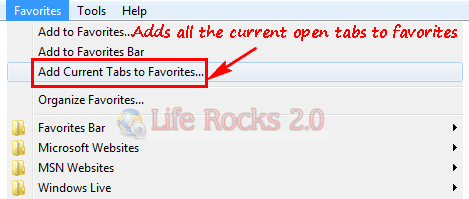
When you are using this option, you will need to open all the tabs individually from the favorite menu and this would be tedious if you have lots of tabs saved into favorites.
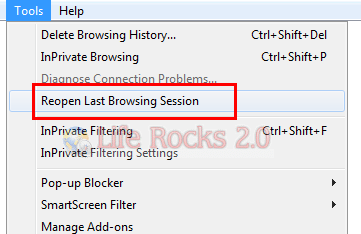
2. Second option is using the “Reopen Last Browsing Session” option in IE8. This feature can be used from the tools menu. After opening IE8, click on tools and select “Reopen Last Browsing Session” and this will restore your last browsing session.
You can also open the last session by clicking a new tab and inside the tab, you can see link for opening the last browsing session under Reopen Closed tabs.
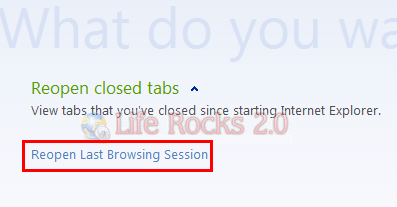
Please note that IE8 will not open the last browsing session automatically when started, you will need to select the last browsing session.



Excellent tips! Thanks!
Using IE8, I dont want to save the many tabs I opened to my favorites but want to reopen the same when I return to my last browsing session. For the likes of me, I can’t seem to recover the tabs that I last reopened, except when I do choose the “reopen last browsing session,” only one tab is recovered, the rest are gone even when I choose to reopen all closed tabs. Why is this so? Is this just me or did I miss something here? Sometimes when my IE crashes and I want to restore the tabs, they are somewhat lost if you fail to save them. This isn’t so with Firefox, wherein it can recover the last browsing session tabs and even remembers how many windows you opened with its tabs.
I had the same experience. I find that I must ashut down IE from the “File>Exit” or it will not work. My old habit is to close it from the “X” in the upper right corner and that will not save the session.
I have a problem. When I reopened the last browsing session, only one tab was recovered even when I chose to open all closed tabs. Since I don’t like to save the tabs to my favorites, I prefer the old IE ver. where it asks you if you want to save your opened tabs on exit. Firefox on the other hand, not only remembers your tabs but also all the other tabs of your separate window browser that you opened simultaneously.
Microsoft software – 1 step forward and 1 step backwards (sometimes 2 steps backwards re: vista).
Bring back tabbing like in IE7.
Firefox really really…. sucks.
Very useful.. Thank you so much
Under IE 7, if you save the current tabs to your favorites you do not have to open them manuallly one by one( as stated above). Under favorites select the folder and click the blue arrow that appears near the folder or right-click and select “Open in Tab Group”. This will open all the tabs at one time.
Related to this issue is the IE8 lost its ability to save to Favorites? I’ve searched various places and read and tried to do various fixes. Nothing has worked. It was a mere upgrade to IE8 from IE7. New HP laptop running Win 7. I did read something about “levels” of security. It was like reading Klingon; I had no clue what I was to do. Perhaps that was the fix? I’m confused about which to use anyway– 32bit or 64 bit?
Thank you.
kalar43
Great info, thanks. Im glad there is a way to reopen the last browsing session. Since vista crashes all the time.
Hey, great article. we recently produced a good video for adding your favories to IE8 tabs thought it may be of interest to some peeps..
It’s here http://www.techsonsite.co.uk/tutorials/how-to-add-your-favorite-websites-to-internet-explorer-tabs/
Let us know what you think
Restoring last browsing session is useful, but it does not allow to save/restore sessions previous to the last one.
Of course, you can save your tabs by making them favorite, but such way you don’t save the history of tabs.
There is a free tool for saving/restoring any sessions in IE8: http://luckywarepro.com/products
IE8 doesn’t always save last browsing sessions – so if you really want it, you need to save it yourself.
I haven’t found a way to get the session to open by itself from Favorites – each tab has to be opened individually.