

Today while starting Outlook 2010, it was throwing a strange error, soon after the splash screen it showed this error “Cannot start Microsoft Office Outlook. Cannot Open the Outlook Window”. Even after uninstalling and repairing Outlook 2010 using the Office 2010 set up, the same error occurred. Outlook failed to start even the safe mode when this error occurred (Click CTRL to open Outlook in safe mode).

This error is due to the problem with Outlook navigation panel which is failing to start and this could be due to many reasons like improper shutdown of Outlook.
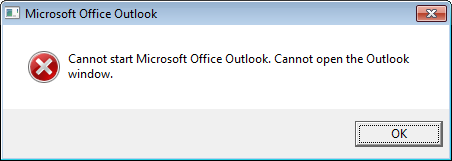
How to fix this issue:
The fix to this problem depends on the issue with Outlook. You can fix this issue using the methods mentioned below.
1. Open Start menu and Click Run (Windows Key + R) and type Outlook.exe /resetnavpane. Now try opening outlook, if the issue was due to navigation panel, resetting it would solve the issue. If the issue is still not solved, try step 2.
2. Run the Inbox Repair tool in Outlook- Inbox repair tool (Scanpst.exe) is included in the Office CD and is a tool to repair issues with Inbox personal folder (.pst) files. You can check the Microsoft KB article 272227 for more details on this.
It is most likely that you can solve this issue using Step 1.
Thanks to Microsoft answers for the tip.




Check out the Office Facebook page for tons of helpful resources to help you use all the features of your Office programs. You can post your questions to the Wall and get help directly from Microsoft!
http://www.facebook.com/microsoftoffice
Share your expertise with other Outlook enthusiasts at
http://www.facebook.com/pages/Microsoft-Outlook/82443952619
Cheers,
Kate
MSFT Office Outreach Team
Thank you sooo much for posting this. It worked! Hallelujah!
Thank you for such a nice explanation. I had a problem with Outlook and now it is solved. I had a real big stress as i was scared to loose all my contact information i had in my Outlook. THANK YOU VERY MUCH!!
Thanks so much – there was a problem with another application that frooze the maching when Outlook was open
This solved it
Thanks for that, straight after a windows update outlook failed to open, but your reset pane line fixed it,
Thank you SO much for having this information handy. I had that error message come up and I thought it was the end for my outlook and all the emails I had in it. This saved me.
Thanks!
Microsoft totally sucks, I went to their website to try to find help on this and Nada without spending 99.00 and that would take 24hrs and via email, or 259.00 and 8 hour wait time. Don’t we pay enough when we buy these products? Anyway enough rant, your fix seems to have done the trick. Thanks…
Thank you. Outlook.exe /resetnavpane worked fine. You saved my couplre of hours. 🙂
The resetnavpane worked! You are a genius. I have been having to access my e-mail through web mail (which is a total pain.)
Thanks!
Yaay! Thanks so much, this was very useful and I got the problem fixed! 🙂
Running outlook /resetnavpane worked for me on Office 2010 tp!
i did same as ur introduce but 🙁 Outlook isn’t still running.
Very grateful for the post! After commiserating with colleagues trying to solve this from the Windows troubleshooting page, I clicked into the tech blog and ran the fix in 2 seconds! thanks!
Outlook.exe /resetnavpane does absolutely nothing for me.
I can’t find Scanpst.exe anywhere…
Office 2010 beta x64, Windows 7 Home Premium x64.
Fantastic! I tried several other “fixes” until finally finding this one – which worked (Win 7 32-bit Outlook 2007). Thank you!
cool it really works for 2007 version
fantastic… yep, worked for Outlook 2007 as well…
thanks for sharing…
Hi, I agree, you are a genius! I just love the way Kate hops on to encourage everyone to head off to Facebook; no mention of the problem’s potential solution. Honestly, I am a follower of the “piece of shit” mutterers when it comes to personal computers, Microsoft, and the problems and conflicts that seem to be never-ending! Outlook Connector, hah!
Thanks, That really help, fix the problem
YEEEEEEEEEEEEEEEEEEEEEEESSSSSSSSSSSSSSS!
Option 1 did not work, Option 2 Did.
Thanks.
thank you!!!!! you saved my week!
Option one worked for me. Thanks for the quick fix!!
Thanks so much…nice,simple and it solved the problem. My hectic life owes yuou big time!
Worked like a charm. You’d think by now they (Microsoft) would script this into the error message.
Thank you! And I thought all those emails had gone for good. Option 1 fixed it pronto. Lifesaver!!!
Thanks for the fix tip! Worked just like I hoped it would!
Thanks again!
abs brilliant dude!
thanks a lot
the first step worked
It didn’t work. I tried Option 1. It came up with the error message again. I also can’t find scanpst.exe on my disc anywhere.
Thanks this resolves my issue.
Thanks for the quick fix (option 1)! Almost had a meltdown when I thought I lost my Outlook forever!
Thx a billion. I used option 1 and it solved my problem. Nice!
Thanks so much. Problem solved, and now have enabled “run” on Windows 7. My question is WHY did this happen?
Thanks so much. Other fixes did not take me, a complete tech novice, through step by step the way you did – very helpful.
option 1 worked for outlook 2007. THANKYOU!!!!
Oh, it’s realy help me. Thank you!
Thanks you sooo much, resetting the navigation panel was the issue. I was looking for a possible solution for hours. Thanks again mate 🙂
Hi,
Thank you so much for this post.It was exactly what I was looking for! immense helpful….
http://godwinsblog.cdtech.in/2010/12/send-sms-directly-from-microsoft.html
I have tried your steps, Its still not resloved the issue…. Please let me know ;if you have any other solution for the above problem…Please suggest …..
Thanks,
Shakeel
Here is what we did to get rid of this problem. It seems odd as does the error.
We had this error after an update was installed. We installed the update with a user that has administrator privileges.
We tried the 101 under-the-hood tricks that are stored in an empty m&m jar on Bill Gates front-porch first without success.
We then went to the Icon that is created in the Office Folder for Outlook, and edited the Shortcut -> Advanced Properties to run as administrator. This seemed to allow Outlook to finish a step that the implicit administrator privileges used during the update did not.
After this step and launching outlook, it does not seem to matter if this property is chosen or not for further launches.
We suspect this was an update oops, oops.
Hope it works for you as well.
on windows 7
unchecked the compatibility mode.
this work for me.
hi even i am unable to open with run command please help me