Gmail Labs seems to the most happening place as they are constantly adding new features into Gmail. Today Gmail labs has added another feature for converting emails into Google docs. If you ever wanted to have the email conversations as a document, this is the best feature to do it. Once you have enabled the feature in Gmail labs, you can start creating documents for any email.
When this feature is enabled, you can see “Create a Document” link on the right hand side of the email when it is opened.
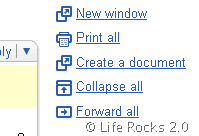
So you don’t have to take the pain to copy text from the email to the document and then saving it. To turn on this feature, go to the Gmail Labs tab under Settings, select "Enable" next to "Create a document" and hit "Save Changes" at the bottom.
In case you want to open a blank document from Gmail, the keyboard is G followed by W, make sure that keyboard shortcuts are enabled for Gmail.