

PowerPoint has the ability to add comments and metadata in all the presentations and this type of information is added to the presentation in the process of creating it. But in case you need to publish your presentation outside your organization, you may want to remove comments, notes hidden in the text, or other personally identifiable information from the presentation. You can inspect and remove the comments and metadata from presentation.

Follow these simple steps to remove the comments and metadata from Presentation 2007
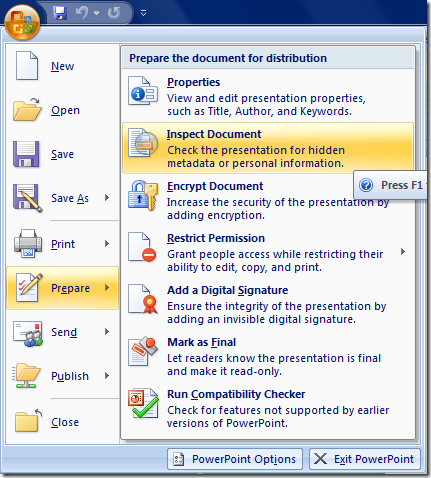
1. Click the Office button(top left hand corner) , and then on the Prepare menu, click Inspect Document. (If you have not saved your document yet, you will be prompted to do so.)
2. Here you will get the list of items that you want the Document Inspector to look for. Most of these items will be selected by default.
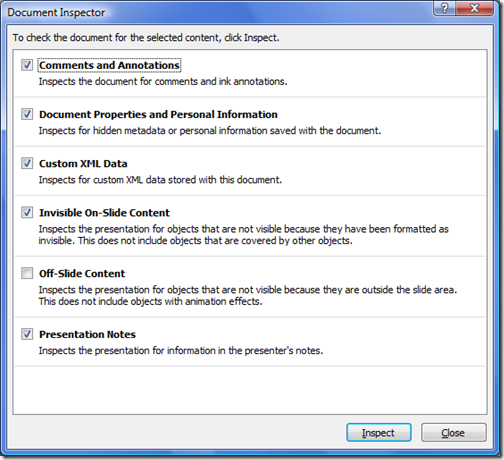
3. Click Inspect to begin the inspection process.
4. You’ll receive a list of inspection results. Click Remove All next to any items you want to have removed from the document.
5. Click Close to close this wizard and save the document with the new changes made.
This will remove all the comments, meta data or any other personal information available in the document.





Awesome. Thanks for the tip. You just saved me a lot of time manually deleting notes!