

Windows Vista has improved the UI and added lots of features like Aero effects when compared to XP. Vista is definitely a great looking OS (we are comparing only the looks here). You can customize Vista just like XP using visual styles. There are lots of styles available based on whether you have/enabled aero effects. So here is a list of seven good looking visual styles (themes) for Windows Vista.
NB: Before installing any theme, please check the instructions provided by the theme author, also check the compatibility of the themes with different versions of Vista. All credit to the author of the theme.
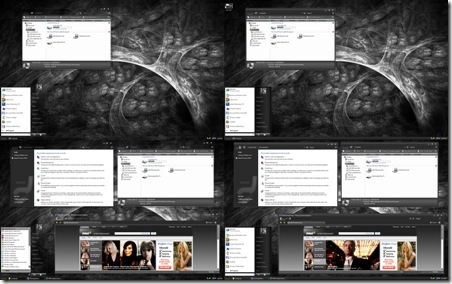
1. Vista Ultimate Grey:
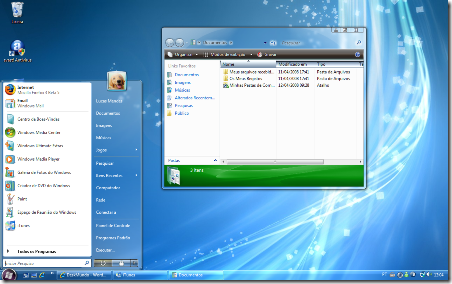
2. Vista Se7en Theme:
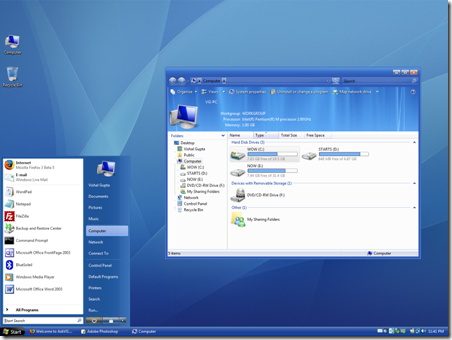
3. Vista Blue Refresh Theme
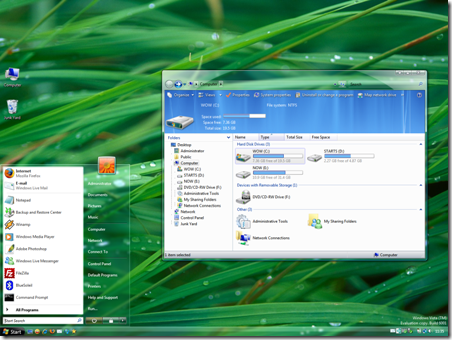
4. AeroVG Theme:
5. Maxclear V3.1 theme
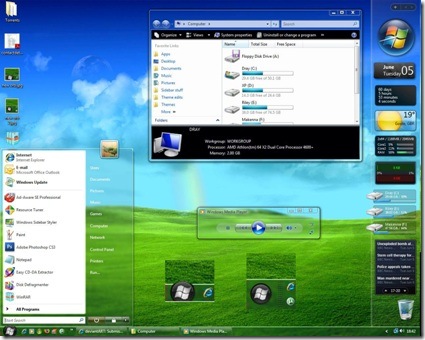
6. Reanimaero VS
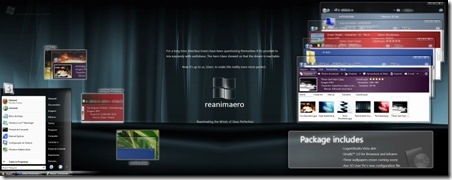
7. Vista GlassNeon
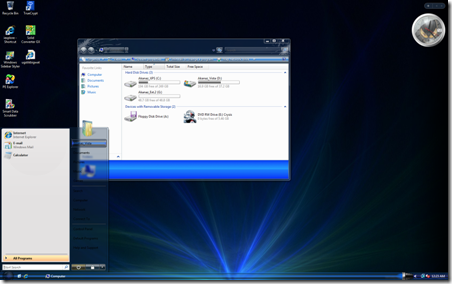
Hope you liked these, there are many more themes in Deviantart.








Cool themes. Will definitely try out Vista Ultimate Grey, Reanimaero, and Vista GlassNeon.
They are awesome….. but I don’t use vista… I just use vista wall papers…. enough for my system….
Great themes buddy, I like MaxClear. Stumbled.
Great Aero themes, especially the AeroVG. Thanks for the link! Gotta download it now. 😉
@Keith,
Thanks for the Stumble
Yeah, I too like the wallpaper but not the operating system 😀
Hi Nirmal
Thanks for this nice list and mentioning my themes. I really appreciate it. 🙂
They grey theme looks very cool
Cool themes
Thanks 🙂
@Vishal,
Your themes were really good ones. 🙂
Thank you so much. 😀
I don’t really like any of them, none of them are original, just carbon copy look-a-likes of the windows vista standard theme. I have yet to see someone do something cool with vistas transparent windows, so why include them? doing so only limits you to black or dark colors, so don’t make them transparent. I was working on a windows iteration of the fedora nokoda theme, but got busy and its gathering dust on my desktop. Maybe I’ll finish it sometime soon.
Why not a monopoly one with dollar signs and a photoshopped wallpaper of Ballmer laying an egg from a Hungarian chicken?
Windows is trash, I’ll use Linux for free and smile all the way to the bank, not paying a cent.
great list, i also liked max clear as due to its cool transparency.
I really think that Vista is way better than XP. The http://www.mojaveexperiment.com/ really shows how sheep like people can be in not even trying it out. That said, I do agree Vista has its faults, but overall its an improvement over XP.
Thanks a lot for the themes… considering how many bad themes there are out there for Vista (XP seems to have a better offering) these are some pretty good star picks.
hello
I have tried lot of vista themes none of them r working.. when i install it windows classic themes comes.can anyone help?
@Anoop
You’ll need to patch your Windows to use these 3rd party themes. Download VistaGlazz from following link:
http://www.codegazer.com/vistaglazz/downloads/
Install it and then copy the theme folder to “%Windir%\Resources\Themes” folder. Now you’ll be able to apply the theme from Desktop Properties.
PS: You can also apply the theme using Tuneup Utilities, which is the easiest way.
Hello,
Plz tell me how to patch the windows.. i had tried to rename the uxthemes.dll. but i failed. got a notification that i dont have permission to rename it.. plzz help me..
^^ Right-click on VistaGlazz shortcut and click on “Run as Administrator”. It’ll run, then click on “I agree” button and then click on first “computer” icon. It’ll confirm to Patch system files. Accept it and you have done.
Great Collection.. i just downloaded ’em all. 7 different themes for 7 days of week. stumbled 🙂
Hi Vishal,
I had one it but still i couldnt see the themes. still aero was running..
Are 64-bit users out of luck? I don’t see anything on VistaGlazz that talks about a x64 version, only 32-bit. 🙁
Looks awesome! But I’m on XP…still good though.
Muy buenos themes!
Saludoos!
aunque prefiero Windows xp.
currently sporting the nice look of the Vista Ultimate Grey theme. Unfortunately, when I was installing the theme, explorer freaked out on me, so I booted into my trusty live install cd of ubuntu, and finished doing it from there, and then when i rebooted into vista the theme was in effect.
i am currently using Vista Ultimate Grey, it is sweet!
Hi,NIRMAL,this likes good theme
i like it.good service
hi i like theme.good themes.
these aren’t photos of the operative system, cause in the start button says ”start” and the Vista’s start button is the official logo of WinVista
Juan: these are themes for Windows Vista. And in the theme the person can do whatever he wants, in that theme the person who made it decided to put “Start” as the “start menu” as opposed to the windows logo, or just a blank square like in the first theme.
thank you
how to use it?
Awesome DUDE!!!!! LUV THIS!!! PEACE OUT!!! JUST ROCK DUDE!!!!!!!!!!111
thanks
hi brotheres i likes theme i downloaded i use this themes.tahnkyou
Wow… amazing themes…. appreciate your effort…
Can someone e-mail me and help me install one of these so I can use it?
thank you SOOOO MUCH!!!!!!!
HEY MAN THAT; very nice gratz’
these themes r cool! vista rules!! peace dudes!
Thank you for sharing
can u guys help me out how to install this theme pls
i have downloaded the theme bt i downt know how to apply it………..plzzzz help me out
All of them are quite cool.
All them are very nice……
thanks ,,, nice theme,, i like it
This is a good tip particularly to those fresh to the blogosphere.
Simple but very accurate information… Thank you for sharing
this one. A must read article!