

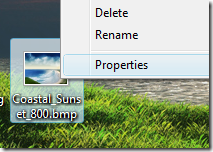
Every file or folder in Vista has owner. The owner controls how permissions are set on the object and to whom permissions are granted. If an administrator need to edit or change permission on any file or folder, then the ownership of file needs to be taken. The owner can always change permissions on an object, even when denied all access to the object. To take ownership of files, right click and select Properties.
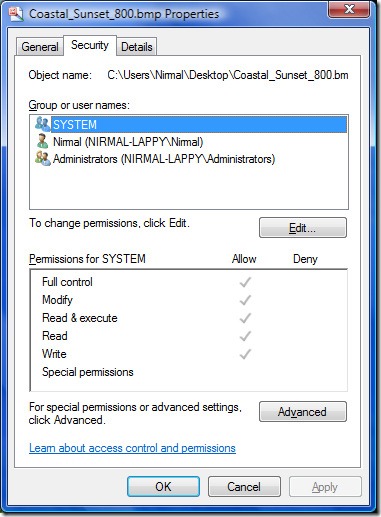
In the properties window, select Security Tab,
Click the Advanced button in the Security tab. In the Advanced Security Settings, select Owner tab.
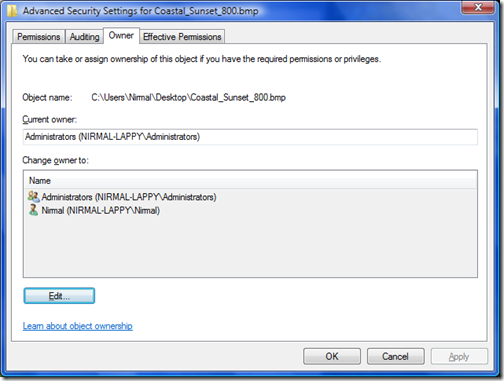
Here you can view the current owner of the file and also the option to change owner. Click the Edit button at the bottom.
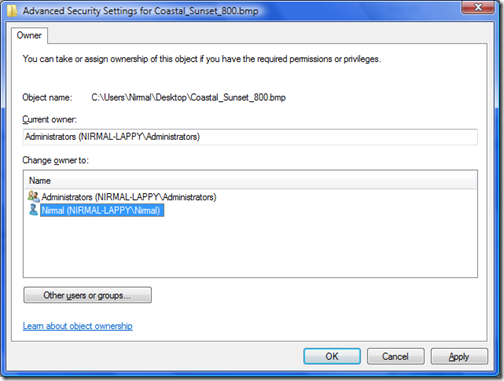
Here you can select the new owner of the file and apply the settings. You get a security warning that you need to close the file and open it again for settings to take place.
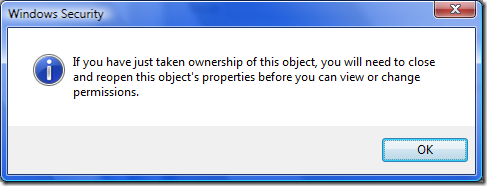
Now the ownership of file is changed to the new user.




I would like to add something, please note only users belonging the administrator group can take ownership on any windows file according to the default group policy on windows vista. So you need to be an administrator to take ownership.
@Abhishek,
Thanks for that input, infact I had missed out on that point.
But how to change owner for several files or foldefrs at once?
It would be even better to may it in console. Is it possible?