

Compared to Windows XP, Vista has more options in folder views. The folder views may not be consistent across all folders. Sometimes one folder will shows list details and other one shows folders in thumbnails. Many times you would like to see same folder views across all folders in Vista. Setting the folder view same across all folders is a simple step.


To set folder views same across all folders, first select the folder view which you would like to have from the views menu.
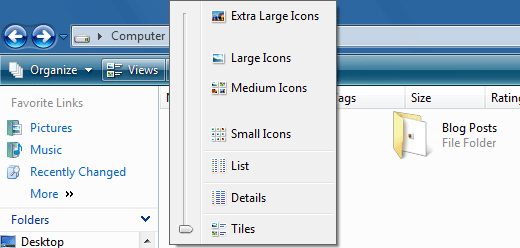
Once you have select the view, click Organize menu and select Folder and Search Options. Select View tab in the dialog and click the Apply to Folders button to have this view across all folders.

Now check the folders and you can see the same view across all folders. This method applies to Windows XP as well.





It’s the same as in Windows XP.
@Elections photos,
Yea its same as XP, I have mentioned it.
It would be great if there is more customization on this….sometimes it gets little nagging…
🙁 This did not work for me. I want to view them as detailed and after trying this, I get most of them in detailed mode and some in large icon mode. Never had this problem before until Vista. Really kind of annoying. Any suggestions??? ❓
rhis did not work for me. I went to click the ‘Apply To Folders’ button but it is ALWAYS DISABLED and cannot be clicked on. I have full administrative privelages, too. Anybody have the same problem?
Just the thing I was looking for!
Now all of my Photo directories display in the same consistent way.
Thanks!!
In Vista, how do I make a selection of pictures into one folder and move that folder to “my pictures”?
This is simply not correct. Whoever wrote this article has gone on the basis that Vista acts like XP which it doesn’t.
I regularly set the folder settings then ask Vista to apply it to all but it ignores me and seems to want to set it ****ing randomly.
<_<
doesnt work for me either. vista sucks
annoyed says:
January 16, 2010 at 12:34 am
doesnt work for me either. vista sucks
I AGREE!