

If you handle different types of graphic files, you may need to install different softwares to view these formats and convert them. XnView is a simple software which can solve this problem. XnView a software to view and convert graphic files and very simple to use as well. XnView supports 400 different formats and can convert upto 40 formats.
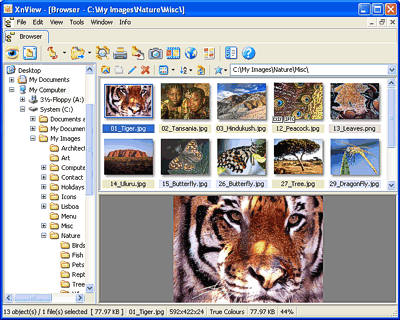
Features of XnView are;
- Multipage TIFF, Animated GIF, Animated ICO support
- Resize, rotate, crop support
- Lossless rotate & crop (jpeg) support
- Adjust brightness, contrast…
- Auto levels, contrast
- Modify number of colors
- Apply filters like blur, average, emboss etc
- Apply effects
- Slide show with effects
- Batch convert, batch rename
- Create WEB page
- Screen capture
You can check out the complete features here. The complete lists of formats supported by XnView is listed here. XnView is free for private, non-commercial and educational use. XnView is supported in Windows, Mac and Linux.
(Img src: XnView)








In windows, I will recommend Irfan View for this purpose.
@Binny,
Irfan view is also a good software, but I feel this has much more options.
Well I too like Irfan view but this provides conversion to 40 different formats which makes it interesting, will definitely try this out
@Keith,
The 40 conversion is what makes this software better.
This is a great tool, i used it, it works great
Ugh, I hate XnView, primarily because it is sorta cloning IrfanView. Besides, who needs these when you have GIMP?