
Techniqued- Technoloy, Review and Tutorials
  • Android
  • Freewares
  • Tutorial
  • Windows 11
  • macOS
No Result
View All Result
Techniqued- Technoloy, Review and Tutorials
  • Android
  • Freewares
  • Tutorial
  • Windows 11
  • macOS
No Result
View All Result
Techniqued- Technoloy, Review and Tutorials
No Result
View All Result

Compress and Extract Zip, Zipx, 7zip, Cab, ISO and RAR files with Power Archiver

Nirmal by Nirmal
March 1, 2011
in Freewares
0
Share on FacebookShare on Twitter

PowerArchiver is an award winning compression utility which can compress and extract Zip, Zipx, 7zip, Cab, ISO, RAR files. PowerArchiver has released the free version of the popular tool. The free version is only for personal use. PowerArchiver Free fully supports open source 7zip format which provides up to 50% stronger compression than zip, with some unique features available only in PowerArchiver such as optimized compression mode where best format is selected automatically.
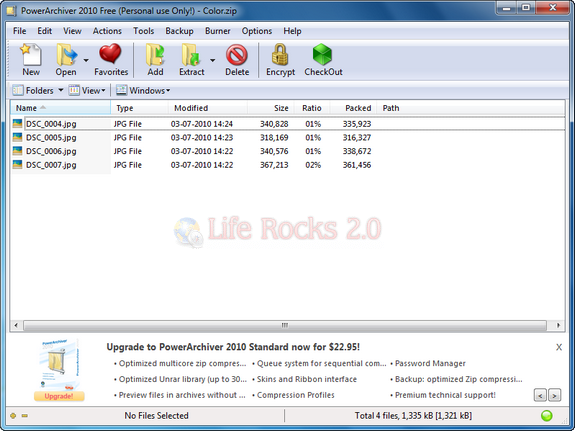
Power Archiver

Features;

  • Our own ZIP/ZIPX engine with full support for ZIPX (LZMA, PPMD, JPEG, WavPack, BZ2). Yes, it is still only utility that fully supports ZIPX archives created by WinZip 12/13/14. It also has Unicode support, full AES encryption support (both versions of AES spec), unlimited file/size support.
  • Full 7-Zip support is still there together with unique support for updating solid archives via re-compression.
  • Full format support: ZIP, RAR, 7-ZIP, CAB, ACE, LHA (LZH), TAR, GZIP, BZIP2, BH, XXE, UUE, yENC, and MIME (Base 64), ARJ, ARC, ACE, ZOO plus ISO, BIN, IMG and NRG, just as regular PowerArchiver.
  • Plugin support (.wcx from Total Commander)
  • Wonderful shell extensions are 100% in.
  • Windows 7 support – jump lists, taskbar progress and taskbar icon overlays work beautifully.
  • 7 different tools: Encrypt, Convert, Batch Zip, Multi Extract, SFX Wizard, Repair ZIP etc – all completely free.
  • Explorer View mode which turns PA into File Manager
  • PowerArchiver Backup with ability to create backup scripts compress them to zip format, encrypt, filter by: filename, folder, size, date.

The free version is available for download at File Forum.

Tags: Compress FilesExtract FilesFile CompressFreewaresPower Archiver
ShareTweetSendSend
Previous Post

Lock/Unlock Folders in Windows with BuduLock

Next Post

Guide to Get Started with Office 2010

Related Posts

Freewares

How to Find the CPU Temperature in Windows 11

November 29, 2023
Featured

7 Best Free Cleaner Tools for Windows 11

November 27, 2023
Freewares

The Best File Manager App for Windows 11

November 26, 2023
Freewares

Unlock Hidden Features on macOS with this tool

August 21, 2023
Freewares

10 Best Minecraft Mods You Should Download

April 19, 2023
Freewares

How to Password Protect Folders in Windows 11

March 15, 2023

Leave a Reply Cancel reply

Your email address will not be published. Required fields are marked *

This site uses Akismet to reduce spam. Learn how your comment data is processed.


Latest Articles

How to Fix “Installation can’t continue” when trying to Update Nvidia Graphics Drivers

Download Windows 11 24H2 ISO (Offline Installer)

Can I Run Windows 11 without Activating

How to Use Snapchat on PC

How to Delete YouTube Search and Watch History on iPhone

How to Use Energy Saver on Windows 11

Techniqued- Technoloy, Review and Tutorials

© 2021 Techniqued - Technology, Tips, Tricks and Reviews

Navigate Site

  • About Us
  • Advertise with us
  • Contact Us
  • Copyright Policy
  • Disclaimer

Follow Us

No Result
View All Result
  • Android
  • Freewares
  • Tutorial
  • Windows 11
  • macOS

© 2021 Techniqued - Technology, Tips, Tricks and Reviews

This website uses cookies. By continuing to use this website you are giving consent to cookies being used. Visit our Privacy and Cookie Policy.





