How to Disable Task Manager on Windows Vista
There are many instances when we like to disable Task Manager especially if you share your PC with others. Once task manager is disabled users will not be able to kill processes or services using the Task Manager. Task Manager can be disabled from the Group Policy editor. This option is available only in Vista [...]
Download Windows Seven Theme for Windows Vista
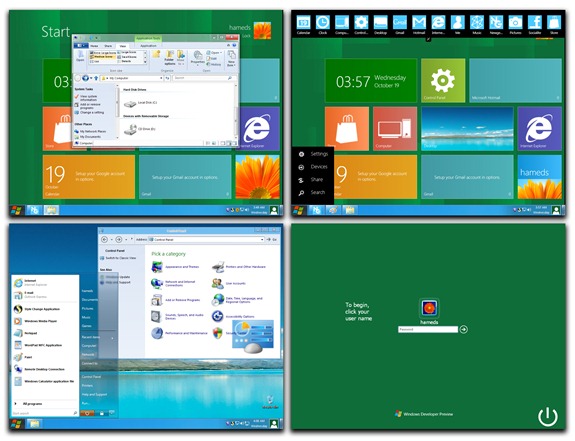
Few days back we had written about some beautiful themes for Windows Vista based on Aero effects. Here is another theme for Windows Vista based on Windows Seven OS and created by Vishal. This theme was created based on the request from few people.
1. New Taskbar similar to Windows Seven (although the actual look of [...]
How to Disable Access to Removable Drives in Vista
In case your PC is shared one and many others users access it, then there are chances of virus or malware attack through removable drives(CD/ USB drives). You can configure your PC such that removable drives are not accessible in Vista. If this setting is enabled, then no access is enabled for removable. To disable [...]
How to Enable/Disable Hibernation in Windows Vista
When Windows is switched to hibernation mode, Windows saves the current state into a file called hiberfil.sys. This files size is very huge and will extend to several GB. In case you are not using hibernation, you can disable it to save hard disk space. To disable hibernation, open Start-> All Programs-> Accessories-> Command Prompt. [...]
How to Disable Error Reporting in Windows Vista
Whenever a program hangs or crashes occurs, Vista is able to automatically send relevant information about the failure to Microsoft using Windows Error Reporting (WER), have this information analyzed and obtain a solution to the problem if one exists. In case you are testing beta versions of applications, you might encountered this situation many times. [...]
How to Change the Default Timeout Seconds in Dual Boot Vista
When you have installed two different versions of Windows, say Vista Ultimate and Vista Home premium or XP and Vista as dual boot, these options show up when you boot Windows. But many times the timeout seconds is set as very low value and it becomes difficult to select an OS which is not the [...]
7 Beautiful Themes (Visual Styles) to Customize Windows Vista
Windows Vista has improved the UI and added lots of features like Aero effects when compared to XP. Vista is definitely a great looking OS (we are comparing only the looks here). You can customize Vista just like XP using visual styles. There are lots of styles available based on whether you have/enabled aero effects. [...]
Previous Stories
- How to Disable Task Manager on Windows Vista
- Download Windows Seven Theme for Windows Vista
- How to Disable Access to Removable Drives in Vista
- How to Enable/Disable Hibernation in Windows Vista
- How to Disable Error Reporting in Windows Vista
- How to Change the Default Timeout Seconds in Dual Boot Vista
- How to Show only Specified Items in Control Panel in Vista
- How to Add Additional Clocks in Windows Vista
- Microsoft Releases Windows Vista Performance and Tuning Guide
- How to Abort Shutdown or Restart in Windows Vista
- How to Manage Recent Items List in Vista
- How to Access Send To Menu Quickly in Vista
- How to Create a Quick Launch for Window Switcher (Flip 3D)
- How to Set Default File Associations in Vista
- How to Setup Multiple Network Connectivity on Windows
- How to Make Windows Vista SP1 Installation Permanent
- Create Vista Boot Screens with Vista Boot Logo Generator
- How to Take Ownership of Files and Folders in Vista
- How to Create a Password Reset Disk in Vista
- How to Reset Windows NT, XP and Vista Admin Password
- How to Backup Files and Folders in Windows Vista
- Windows Vista Explorer Groups and Stack Feature
- How to Check the Reliability of OS and Applications in Vista
- How to Use Natural Language Search in Vista
- Download Window 7 Theme for XP
- How to Select Files and Folders in Vista using Checkboxes
- Tweak Windows with XdN Tweaker Freeware
- How to Set Background for Vista Folders
- How to Copy and Paste Files Faster with Mouse Click
- How to Manipulate the Performance Index of Vista
- Change Vista Color Automatically with Vista Color Transform
- Custom Keyboard Layout with Microsoft Keyboard Layout Creator
- Complete List of Run Commands in Windows Vista
- Enhance GUI in Windows Vista with Vize
- How to Enable CTRL+ALT+DEL Logon in Vista
- How to Disable User Account Control (UAC) in Windows Vista
- How to Export Websites in Security Zone to another PC
- Customize Windows Vista with Vista Visual Master
- Enable Thumbnail Previews in Taskbar in Windows XP
- Modify Boot Manager in Vista with VistaBootPRO
- Give Windows XP a Makeover with XPize
- Windows XP SP3 Available through Windows Update
- How to take Screenshot with Vista Standard Snipping Tool
- Display Thumbnail Previews in Taskbar with Visual ToolTip
- Enable Aero effects (3D Flip) in Windows with Shock Aero 3D
- Stardock Officially Releases MyColors
- How to Hide a Shared Folder in Windows
- Restore Open Folder Windows after Reboot
- Convert Windows Vista into OSX Leopard
- Remove WGA Notification with RemoveWGA
- How to Restore Run Command in Vista Start Menu
- Top 8+1 Transformation Packs for Windows and Linux
- How to Make Folder Views Consistent across Vista
- Get Animated Desktop on Vista with DeskScapes 2.0
- Customize Windows Right Click Menu with MMM Free
- Get an Enhanced Start Menu with Vista Start Menu
- How to Customize Windows Vista Logon Screen
- How to Disable Windows Sidebar in Vista
- Get Aero Effect (3D Flip) in Windows XP with WinFlip
- Windows Vista Tips: Automate your Disk Checking
- Windows Vista Tips: Shutdown your System Instantly
- Windows Vista Tips: Disable Autoplay in Vista
- Windows Vista Aero Glass Effects Requirements
- Windows XP Tips: Install/Uninstall Applications in Safe Mode
- Windows XP Tips: Delete Contents from Folder without Deleting Folders
- Windows XP Tips: Get more Secure with XP-AntiSpy
- Windows XP Tips: Reorganise Windows Folders
- Process Explorer: Monitor Processes in Windows
- Windows XP Tips: Customize Folders
- 8 Top Essential Freewares for Windows
- Windows 7 Video
- Window XP Tips: Turn off Autoplay
- Window XP Themes: Top 7 Christmas Themes