

The concept of Libraries was introduced in Windows 7 and it basically acts like a folder which in turn accesses or points to multiple folders. Libraries allows you to manage files like documents, images, videos etc. You can browse your files the same way you would in a folder, or you can view your files arranged by properties like date, type, and author. Libraries like other folders can get corrupted and may not open properly. This could happen because of many reasons, it could even happen due to any third party software install or uninstall.
In such cases, how to repair libraries or restore them back to normal?
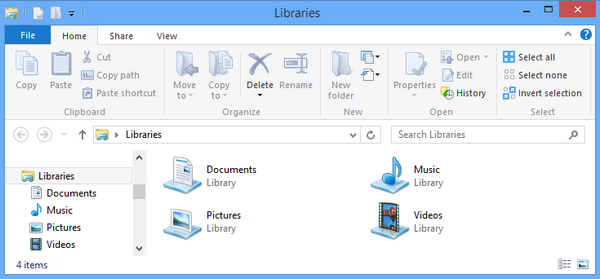
If any of the libaray is not opening or throwing errors, then the best way to repair them is to delete them or create new one on similar lines. In case all of the libraries are not working, you can manually delete all of them from the context menu (right click) and then use the restore option to bring them back.
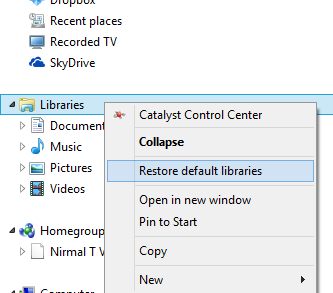
Restore default libraries is an option in Windows 8 (as well as Windows 7) which brings back the default libraries. In case this option isn’t working, delete all the available libraries and follow this method.


Thanks so much for your TIP…It worked like a champ!
Thanks very much for the help! =) It helped with deleting the corrupt folder and then clicking Restore default libraries.
Thanks for posting helpful article. Deleting and restoring libraries worked well. I had to copy files out of them first. It seemed to occur as a result of libraries being referenced on a removable drive bay not dismounting/ejecting properly.
Thnx for the guide, it worked great 🙂
Its give me an error “music.library-ms is no long availble ”
i have i think delt my some library files plz tell me how to repair this ????
Delete all the existing libraries and then follow the method, you should get it back.
Thanks! That worked!
Thanks alot man! Good Work
its still now working I can’t get the folders to reset in windows 8.1 the sidebar in windows explorer is still showing two download libraries in the sidebar what do I do to fix this I even tried to delete Library all together.