

Generally when you boot your Windows, it opens the desktop by default, but with the release of Windows 8, things have changed. Now Windows 8 boots to start screen instead of the normal desktop. This could be annoying for some users as they might want to show the desktop as soon as Windows is booted. In Windows 8, you have to click the desktop tile to open the desktop.
Skip Metro Suite is a new freeware tool for Windows 8 which allows you to skip or bypass the start screen and boot directly to desktop.
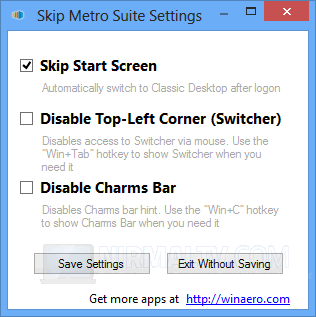
Just install the app and when it runs, check the box against Skip Start screen and save the settings. Next time Windows 8 boots, it shows the desktop directly skipping the start screen.
The app also has option to disable the app switcher and also the Charms bar.
What does this app do?
- Skip Start Screen feature and open classic desktop
- Switcher can be disabled.
- Charms Bar Hint can be disabled.
Skip Metro Suite is a very handy tool for users who want to tweak the settings for start screen and boot directly to desktop.








Good writeup.
What I wonder is whether it’s possible to do the opposite: Lock users into the Start Menu screen (Metro interface, or whatever you want to call it). I’m tinkering with a VDI setup where some endpoint devices would be tablets. It would be great if for those devices I could turn off the actual desktop.
Leaving the mechnism of detecting the device type out of the equation, does anyone know if there’s a way of locking the user into the metro interface?