

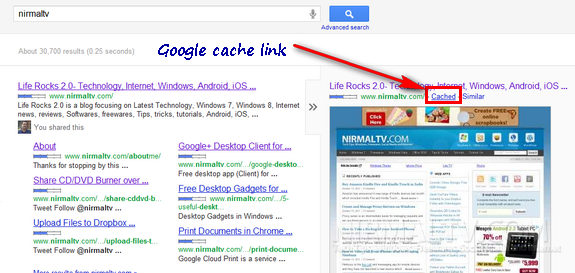
With the new Google Search page, there are lots of changes. Google has rolled out instant search and also previews in the search. The instant previews allows you to click on the magnifying glass to the right of the result to see a visual overview of a page. Once of major change to the design is the positioning of Google Cache and similar sites link. Lots of people are complaining that the Google cache link is missing from the search result.
Google Cache and similar sites link has been moved to Instant preview page. So to see a cache link, you need to get the preview of page by hovering on the arrow and you can see the “cache” and similar sites link available.
Google Cache is an useful service which lets you view a website even if the current status of website is not available. Google Cache can open the previous cached state without images and themes.




Hi Nirmal, back in August I documented this ‘Cached’ link change when I noticed Google’s testing of the new Instant Previews (http://www.blazenwebmarketing.co.uk/blog/new-test-for-googles-instant-preview-feature-aug-2011/).
Moving it is definitely a good move by Google, in my opinion it helps to get rid of a bit more clutter around the results and focus people’s attention on the text that matters. The majority of Google users must wonder what this ‘pointless’ link is anyway!! Majority meaning not us 😉