One of the major changes to Windows 8 is the Metro UI which was carried over from Windows Phone 7. The Metro UI comes with tiles in the start menu and you can pin apps and files on to the start screen. But if you confortable using the old style UI in Windows 7, then you can disable metro UI in Windows 8 with MetroController, which is a freeware tool.
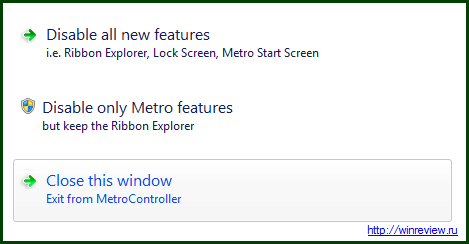
You have two options available, one is to disable all the new features available in Windows 8 including ribbon UI, lock screen, metro start screen etc and the second option is to disable all metro features keeping only the ribbon UI.
You can use this tool to rollback all the changes as well.