

Word 2010 is a powerful application included in Office 2010 and it comes with tons of features. Apart from using it for creating documents, you can also do variety of other tasks. You can set a background image for any word document just like the way you can set a color for document background. Adding image as background makes it suitable for creating invites or greeting cards. To add a background image to Word, select the Page Layout tab and under the page background group, select Page Color.
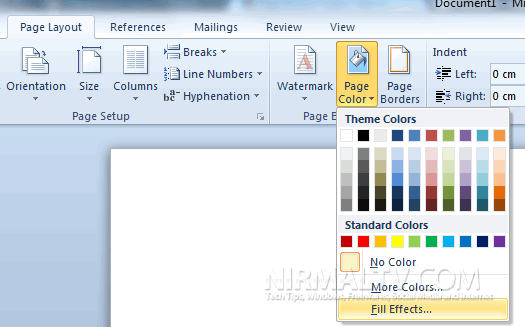
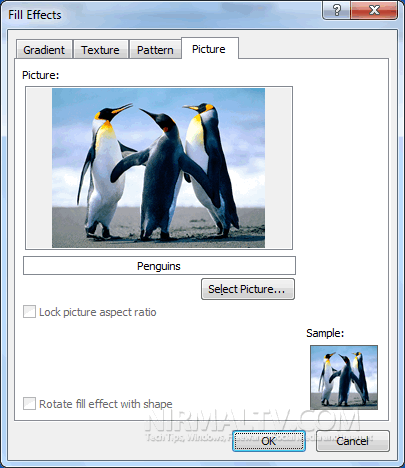
Click on the Fill Effects and select the Picture tab in the Fill effects settings window.
Related Reading: Background Removal Tool in Word 2010
Here you can browse for any image from your desktop, make sure that the image is pretty big, so that it occupies the complete area.
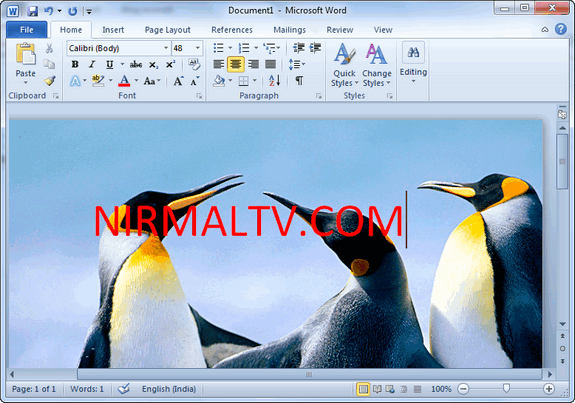
Now you can see the image perfectly added to the background and it will not be altered by any text you add to the document.





I tried printing with the picture in the header. The print looks good.
So the work around is good for me.
But the thing I was trying to do was make a template for a customer
as a default invoice with his logo and his company address. I wanted to use
this as a background. The background is made in A4 format gif.
If you use the fill effect method I just won’t scale.
hi,
plz use the the background image with 96dpi/ppi resolution.
I can’t get the background to fit perfectly when I use this method – it is either too large or tiles when I resize and fill again. What size can I make this so it fits perfectly?
I’ve now figured out how to make it the exact size (change the dpi), but now I can’t figure out how to get it to print?
Great but you can’t print it! I found the Option for printing but it is printed tiled WYSI Is no What you get!
indeed is a DPI problem..
the propotion should be exacted for the paper.. but the dpi are 86 pixels/inch
… nonsense in microsoft ‘still existing :p
what if the JPG can be inserted as a picture but it wont work as a background? any ideas
for background A4 size in ms. Word 2010, please use the size of 800 x 1140 pixels. article can be viewed at http://www.ayahkaka.web.id/blog/ukuran-gambar-background-a4-di-ms-word-2010/