

PowerPoint 2010 has some great features which we had covered and one of them was to insert videos from other sites directly into PowerPoint by specifying the URL. This feature although a nice one does not allow you to search for videos or images, you need to use the browser to do that job. But with authorSTREAM Add-in for PowerPoint, you can search for image and videos and quickly insert them without having to leave PowerPoint.

Once installed, the add-in adds a new tab called authorSTREAM. There is option to search for images or videos from the web. You can enter the search term and click enter and the search results are displayed on the right sidebar.
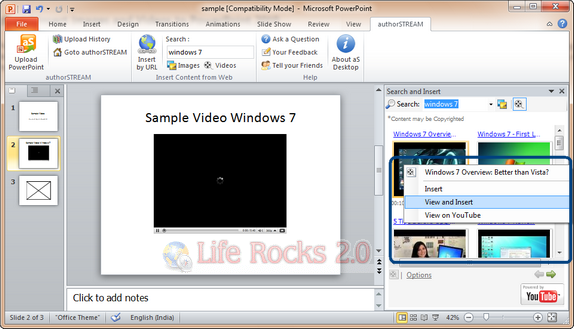
From the right side search results, you can right click any video and insert them into PowerPoint. Apart from this, in case you know the video URL, you can directly insert it by using the Insert by URL option.
Once you have created the PowerPoint presentation, you can also upload it to authorSTREAM website as guest account or your own account for sharing the video.








Hi,
I have added a Video clip of a rotating universe into my presentation. Now I want to insert an image that will come in on top of [in front of] the Video.
When i insert the Image on top of the Video, it shows in the edit window. However, whenever I preview, the Video comes to the forefront and blocks the view of the smaller image.
How can I keep the Image on top of the Video and play the Video while also have the Images transition?
Video is an ActiveX object thus image would not come in front of Video.