

Ever wanted to track activities like mouse clicks, key press or PC uptime on your computer? Here is a simple tool, WinOMeter, which can track keyboard presses, mouse click, computer uptime and also mouse trajectory on your Windows. It can counts the keyboard / mouse presses and computes trajectory that you have arrived by your mouse. You can easily set it up to be automatically loaded on start up if you would like to capture all your activity.
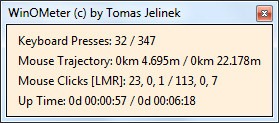
The main display shows the current day activity and there are options to show the history as well.

The history view shows detailed information of mouse clicks including left, center and right clicks on your mouse. History is saved automatically at the end of each day. You can reset the count of clicks at any time.

You can also export your whole history to a CSV file which may be used later in e.g MS Excel. You can do it from the right click menu of from the command line (e.g. winometer.exe /exporthistory history.csv)
WinOMeter is just 100Kb in size and does not require any installation.







