

Macros automate frequently-used tasks in Office 2010 and they are created with Microsoft Visual Basic for Applications (VBA) and are written by software developers. But Macros also pose potential security risk and because of this macros are disabled by default. But you can enable them from the application you are using and want to use macros. Macro security settings are located in the Trust Center and you can enable using the steps below.

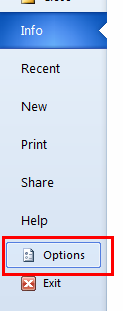
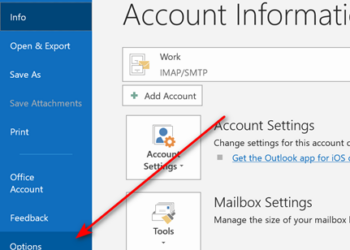
1. Click the File tab and click Options.
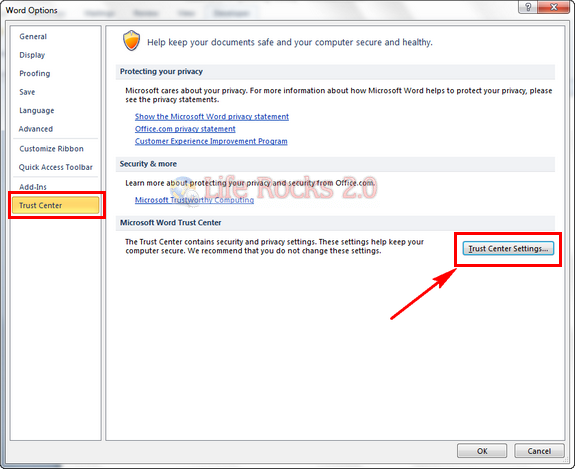
2. This will open the Options dialog box, click Trust Center, then click Trust Center Settings.
3. In the Trust Center, click Macro Settings.
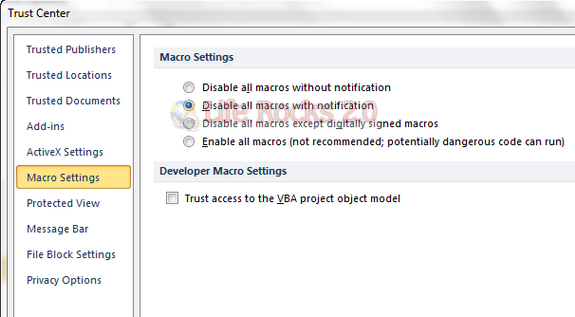
Make the selections you want. Click OK.
Based on the selection you chose, Macros will be enabled. One important thing to note here is that macros will be enabled only for the application you enable it and not for Office 2010 as a whole. For example if you enable macros in Word 2010, then it wont be enabled for all other Office 2010 application, it needs to be enable for each application.






I have tried every method I could find on the web, but I still cannot enable macros for MS 2010. Can someone please help!
for those who have the same problem- u need to reopen word doc after applying change as it is above 🙂
I cannot enable macros in MS2010. I too have done everything that I can find in help and on the web and nothing works.
Yes I have re opened the word doc….any other ideas please
The above steps work but when we want to enable the macros in the file it does’t work. Any clue
Bu how about is the option buttons are disabled? I my case I can’t select any!!!!
In my case as well I am not able to select any , all radio buttons are diabled.
The article is titled How to DISABLE macros. Yet the shot of the dialog window shows a “Disable all macros” option selected. Worse, text then says “make the selections you want,” without explaining what the selections do (it would seem the not-recommended “Disable all macros” option is the relevant radio button, and the checkbox label is gobbledygood to the average user. Oh, and after doing this, with or without checking the checkbox, I still get the “are disabled” popup, macros won’t run..
Obviously, I meant to type, “The article it titled How to ENable macros.” Is that what Nirmal meant to type? Regardless, the solution still doesn’t work. No solution I have found in two days of searching and trying has worked.
The solution doesn’t work. excel 2013.