

Each file in Windows has a created by date and a last modified date. Although you cannot change these dates directly from Windows, there might be some situations when you need to reset these dates. When developing or testing software, there are times when you need to reset a file’s date and time created, last modified, and/or last accessed. FileTouch is a very simple freeware tool to modifies file date/times on individual files, or sets of files.
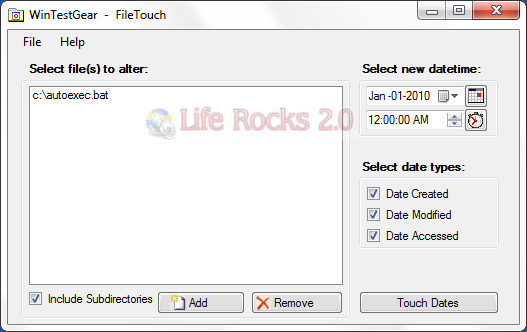
The interface is very simple and all you need is to add files or folders into the tool and on the right hand side you can set the date and also select which all dates need to be modified. The tool allows you to change Date Created, Date modified and also Date Accessed.
Simply run the single executable (no install necessary), fill out the form, then click the Touch button. Note that FileTouch also runs in command line mode for simple batch file execution allowing you to automate your testing.
Requirements:
- .NET Framework 3.5 installed.








Good article.
Best regards !
Here is another tool to try: Directory Report
http://www.file-utilities.com
It has more options of changing the date
Doesn’t work.. Picked a path of c:temp*.*, set “include subdirs” on, clicked Touch.. nothing happened. Win8 64bit