

If you have more than one Internet connection being used on your PC at different location, then it might be difficult to manage and change these profiles every time you change the network connection. NetCon Manager is a freeware tool which enables you to save the settings for each network connection in a profile, so that you can easily switch between them. This tool is specially useful if you need to connect to several networks (to access the internet) from the same computer.
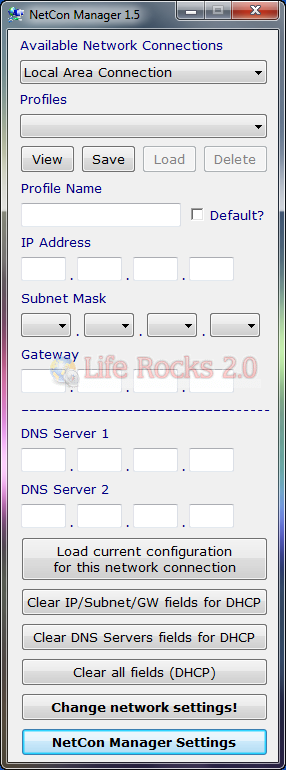
Some of the useful features of this tool;
- After switching to a different connection, press View to refresh the Profiles menu and display the profiles for the currently selected network connection
- If you wish to have a specific profile automatically selected when you press the View button, just check Default
- If you don’t know your current network configuration (or you’re too lazy to get it), you can just press Load current configuration for this network connection and NetCon Manager will automatically fill the fields.
- In order to have the computer obtain an IP address automatically (DHCP) press the Clear IP/Subnet/GW fields for DHCP button
- In order to have the computer obtain DNS server address automatically (DHCP) press the Clear DNS Servers fields for DHCP button
- Of course, if you want the computer to automatically obtain both an IP address and a DNS server address, just press Clear all fields (DHCP).
- After creating your profiles, there’s no need to access the main window just to switch between profiles: you can just change the display mode to Tray only






