
Advertisements


We have covered freeware tools like sFont and Font Picker to view installed fonts on Windows. WinFontsView is another portable application which displays all the fonts installed on Windows. For each font, the application draws 5 samples of the font in different sizes, in order to allow you to easily find and choose the desired font that you need. WinFontsView also allows you to view the fonts as Bold, as Italic or with underline, as well as it allows you to export the fonts list into html file.
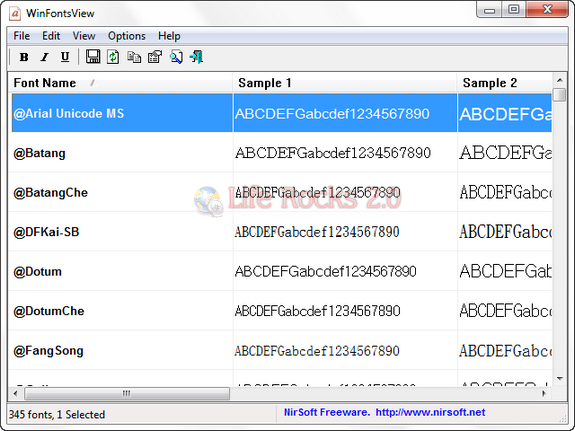
WinFontsView

WinFontsView doesn’t require any installation process or additional DLL files, in order to start using it, simply run the executable file. If you want to view fonts in non-English language, Go to Options->Advanced Options (or press F8), choose the desired character set and type the characters of your language to view in
the sample text. You can also choose to view the fonts as Bold (Ctrl+B), as Italic (Ctrl+I) or with underline (Ctrl+U).

It also features command line functionality. WinFontsView works with the following versions of Windows: Windows 2000, Windows XP, Windows Server 2003, Windows Server 2008, Windows Vista, and Windows 7.


Download WinFontsView

Written By Nirmal

Nirmal is a Technology Blogger and a Microsoft MVP in Windows. Nirmal is also the editor-in-chief and owner of Life Rocks 2.0. He can be contacted at nirmal@nirmaltv.com. You can also follow him on Twitter @nirmaltv

SHARE THIS
ARTICLE
digg_32  stumbleupon_32  twitter_32  facebook_32  delicious_32
friendfeed_32  reddit_32  technorati_32  yahoobuzz_32  rss_32

5 Responses to “View Fonts Installed on Windows with WinFontsView”

  1. [...] WinFontsView is available in several languages and works with all Windows version 2000 and higher. WinFontsView [Via Life Rocks 2.0]. [...]

  2. [...] WinFontsView is available in several languages and works with all Windows version 2000 and higher. WinFontsView [Via Life Rocks 2.0]. [...]

  3. [...] WinFontsView is available in several languages and works with all Windows version 2000 and higher. WinFontsView [Via Life Rocks 2.0]. [...]

  4. [...] WinFontsView is available in several languages and works with all Windows version 2000 and higher. WinFontsView [Via Life Rocks 2.0]. [...]

Leave a Reply

More in Freewares (5 of 5 articles)




