
Advertisements


Flickr is one of the top rated photo sharing sites and if you have an account (especially PRO) with Flickr, then you should be trying out Flickr Schedulr. Flickr Schedulr is a Windows application that automatically uploads pictures to Flickr based on a schedule (For eg. one new picture every day at a certain time). It allows you to create a queue of pictures to be uploaded, along with their titles, descriptions, tags, and the photoset or groups into which they should be added to.
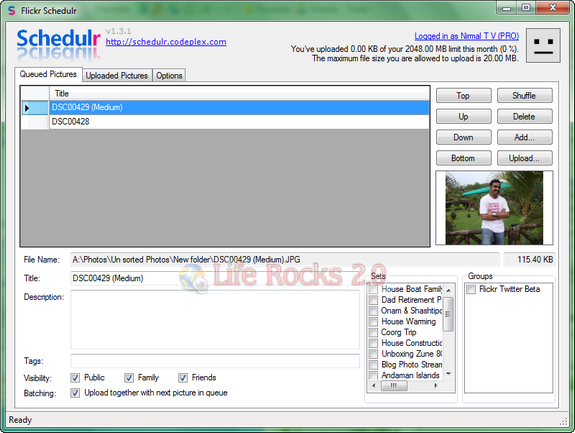
Flickr Scheduler

First time you run the application, you need to log in and authenticate this tool to use Flickr services. Once you are done with this task, you can add all your images to Queued pictures tab. You can add pictures using the add button in the application. If the photo has a tag and description, then they are automatically added to this tool.
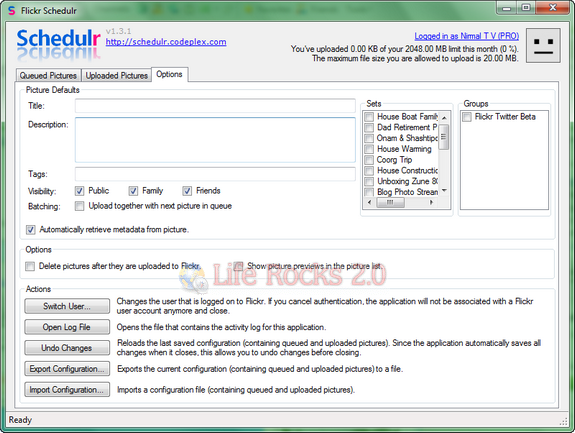
Options

To schedule photos upload to Flickr, use Windows Tasks Scheduler (you can see our article on how to schedule tasks in Task Scheduler) or refer the instructions on the Scheduling help page of this tool) to run Flickr Schedulr at your desired schedule with the “/upload” command line argument. Every time the task is run, the next batch of pictures in the queue will be uploaded and moved to the “Uploaded Pictures” list.

Features

  • Easily maintain a queue of pictures to be uploaded to Flickr.
  • Edit the title, description, tags and visibility settings for each picture, and optionally the photosets and groups to which the picture must be added.
  • Get a visual overview of the queue through the inline picture previews.
  • Drag and drop pictures onto the queue from Windows Explorer.
  • When present in the file, automatically retrieves the title, description and tags from the picture when it is added to the queue.
  • Warns you if there are pictures in your queue that are larger than the maximum file size you are allowed to upload.
  • Can be run from the command line with the “/upload” switch to upload the next picture in the queue.
  • Keeps a history of all pictures that have been uploaded.
  • Shows you all your important account information, e.g. your remaining upload quota.
  • Import and export the configuration (containing queued and uploaded pictures).
  • All settings are automatically saved when you close the application.

Download Flickr Schedulr

Written By Nirmal

Nirmal is a Technology Blogger and a Microsoft MVP in Windows. Nirmal is also the editor-in-chief and owner of Life Rocks 2.0. He can be contacted at nirmal@nirmaltv.com. You can also follow him on Twitter @nirmaltv

SHARE THIS
ARTICLE
digg_32  stumbleupon_32  twitter_32  facebook_32  delicious_32
friendfeed_32  reddit_32  technorati_32  yahoobuzz_32  rss_32

10 Responses to “Flickr Schedulr Automatically uploads to Flickr based on a Schedule”

  1. [...] have covered a freeware tool to upload photos to Flickr automatically using a schedule. Social Screen Capture is another free tool which can upload your screen capture directly to Flickr [...]

  2. [...] The application could be a bit easier to use, and it’d be nice if you didn’t have to set it up with Tasks Scheduler (you can see more details on how to do this at the app’s homepage), but if you do a lot of uploading to Flickr, it could come in particularly handy. Flickr Schedulr is a free download, Windows only, requires .NET 2.0. Flickr Schedulr [via Life Rocks 2.0] [...]

  3. [...] The application could be a bit easier to use, and it’d be nice if you didn’t have to set it up with Tasks Scheduler (you can see more details on how to do this at the app’s homepage), but if you do a lot of uploading to Flickr, it could come in particularly handy. Flickr Schedulr is a free download, Windows only, requires .NET 2.0. Flickr Schedulr [via Life Rocks 2.0] [...]

  4. [...] handy. Flickr Schedulr is a free download, Windows only, requires .NET 2.0. Flickr Schedulr [via Life Rocks 2.0] Share and [...]

  5. [...] The application could be a bit easier to use, and it’d be nice if you didn’t have to set it up with Tasks Scheduler (you can see more details on how to do this at the app’s homepage), but if you do a lot of uploading to Flickr, it could come in particularly handy. Flickr Schedulr is a free download, Windows only, requires .NET 2.0. Flickr Schedulr [via Life Rocks 2.0] [...]

  6. [...] The covering could be a bit easier to use, and it’d be pleasant if you didn’t hit to ordered it up with Tasks Scheduler (you crapper wager more info on how to do this at the app’s homepage), but if you do a aggregation of uploading to Flickr, it could become in specially handy. Flickr Schedulr is a liberated download, Windows only, requires .NET 2.0. Flickr Schedulr [via Life Rocks 2.0] [...]

  7. [...] The application could be a bit easier to use, and it’d be nice if you didn’t have to set it up with Tasks Scheduler (you can see more details on how to do this at the app’s homepage), but if you do a lot of uploading to Flickr, it could come in particularly handy. Flickr Schedulr is a free download, Windows only, requires .NET 2.0. Flickr Schedulr [via Life Rocks 2.0] [...]

  8. [...] Life Rocks 2.0 Sitio Web: Flickr Schedulr Tags: flickr, flickr schedulr, imagenes, programar, [...]

  9. [...] The application could be a bit easier to use, and it’d be nice if you didn’t have to set it up with Tasks Scheduler (you can see more details on how to do this at the app’s homepage), but if you do a lot of uploading to Flickr, it could come in particularly handy. Flickr Schedulr is a free download, Windows only, requires .NET 2.0. Flickr Schedulr [via Life Rocks 2.0] [...]

Leave a Reply





