
Advertisements


Google Chrome is claimed to be one of the fastest web browser available, but it is still in beta and lots of features are missing. ChromePlus is a browser build on Chromium with all the features of Google Chrome and apart from that it has features like Mouse gesture, Super drag, IE tab, context menu download support etc. ChromePlus is aimed to provide the most easy-to-use browser based on Chrome. ChromePlus is completely free with no function limitation and you can use ChromePlus to surf the internet.
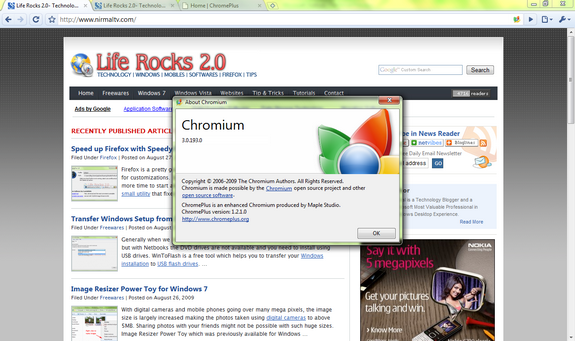
Chrome Plus

Currently, ChromePlus has 5 extra features when compared to Google Chrome;

1. Double click tab to close page.

2. Mouse Gestures- In ChromePlus, you can make efficient commands with easy mouse gestures.
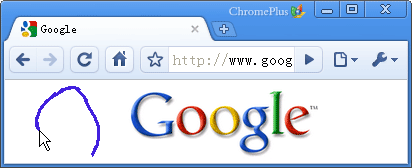
gestures

3. Super drag- Drag a link in the page with your left button and drop it somewhere else in the page. This can create a new page(tab) to open the link; Dragging and dropping a block of text in the page will create a page and search the text with your default search engine.

4. IE tab for websites which supports only Internet explorer.
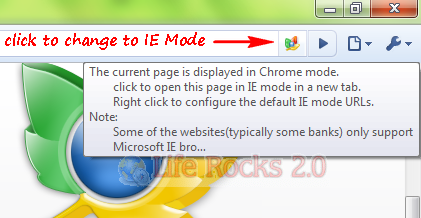
IE Tab

5. Download tools supported in context menu- Chrome Plus supports
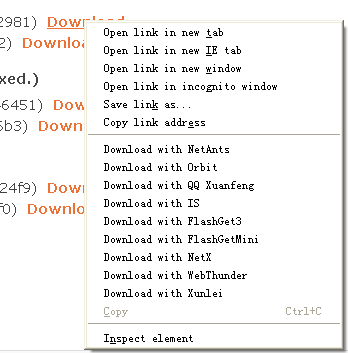
DownloadTools

ChromePlus is definitely worth a try especially if Chrome is your favorite browser.

Download Chrome Plus

Written By Nirmal

Nirmal is a Technology Blogger and a Microsoft MVP in Windows. Nirmal is also the editor-in-chief and owner of Life Rocks 2.0. He can be contacted at nirmal@nirmaltv.com. You can also follow him on Twitter @nirmaltv

SHARE THIS
ARTICLE
digg_32  stumbleupon_32  twitter_32  facebook_32  delicious_32
friendfeed_32  reddit_32  technorati_32  yahoobuzz_32  rss_32

22 Responses to “ChromePlus- Google Chrome with Extra Features”

  1. [...] I had no problems with ChromePlus on a 32-bit Windows XP system, but Lee found that it didn’t play well with his computer running the x64 version of Windows 7. Your results may vary. [via Life Rocks 2.0 [...]

  2. [...] play well with his computer running the x64 version of Windows 7. Your results may vary. [via Life Rocks 2.0ChromePlus adds IETab, mouse gestures, more to Google Chrome originally appeared on Download Squad [...]

  3. [...] I had no problems with ChromePlus on a 32-bit Windows XP system, but Lee found that it didn’t play well with his computer running the x64 version of Windows 7. Your results may vary. [via Life Rocks 2.0 [...]

  4. [...] ChromePlus is freeware, Windows only. (Note: You may have some trouble with ChromePlus on a 64-bit install of Windows 7—I had trouble getting the app to work correctly on my install, and so did one of the folks at Download Squad.) ChromePlus [via Life Rocks 2.0] [...]

  5. [...] ChromePlus is freeware, Windows only. (Note: You may have some trouble with ChromePlus on a 64-bit install of Windows 7—I had trouble getting the app to work correctly on my install, and so did one of the folks at Download Squad.) ChromePlus [via Life Rocks 2.0] [...]

  6. [...] my install, and&#32&#115&#111 did one of the folks at Download Squad.) ChromePl&#117&#115&#32[via Life Rocks 2.0] Share and [...]

  7. [...] ChromePlus is freeware, Windows only. (Note: You may have some trouble with ChromePlus on a 64-bit install of Windows 7—I had trouble getting the app to work correctly on my install, and so did one of the folks at Download Squad.) ChromePlus [via Life Rocks 2.0] [...]

  8. [...] I had no problems with ChromePlus on a 32-bit Windows XP system, but Lee found that it didn’t play well with his computer running the x64 version of Windows 7. Your results may vary. [via Life Rocks 2.0 [...]

  9. [...] ChromePlus is freeware, Windows only. (Note: You may have some trouble with ChromePlus on a 64-bit install of Windows 7—I had trouble getting the app to work correctly on my install, and so did one of the folks at Download Squad.) ChromePlus [via Life Rocks 2.0] [...]

  10. Just wanted to point out that Chrome has been out of beta since long. There’s definitely more talk about the developer builds of Chrome, but it’s already in version 2 as a stable browser.

    ChromePlus definitely looks interesting at the moment, but I’d rather wait for Chrome’s extension policy to get better and then add required add-ons myself.

  11. [...] ChromePlus is freeware, Windows only. (Note: You may have some trouble with ChromePlus on a 64-bit install of Windows 7—I had trouble getting the app to work correctly on my install, and so did one of the folks at Download Squad.) ChromePlus [via Life Rocks 2.0] [...]

  12. [...] Via If you liked this post: Follow me on Twitter   or    Subscribe via RSS Author: Haris Nadeem He is the founder of Sizzled Core and a Pakistani blogger who loves gadgets and exploring out the web! [...]

  13. [...] Chrome as your default browser. The extra features are definitely nice. So give it a shot! [via NirmalTV] AKPC_IDS += "13903,";Enjoyed this post? Subscribe to Online Tech Tips via RSS Feed or via Email [...]

  14. [...] ChromePlus Builds off of Google’s Browser This browser is based on Google Chrome, and includes features like rendering a site with IE, mouse gestures, and more. [...]

  15. [...] ChromePlus Builds off of Google’s Browser This browser is based on Google Chrome, and includes features like rendering a site with IE, mouse gestures, and more. [...]

  16. [...] Chrome Plus Fuente: Life Rocks 2.0 « Explore&Burn, para copiar CD/DVD desde el menú contextual de [...]

  17. [...] to Google Chrome. You can read a few detailed reviews of ChromePlus on my friend Nirmal’s Life Rocks 2.0, Keith’s Techie-Buzz, LifeHacker, gHacks and [...]

  18. Jeffrey says:

    I like ChromePlus’ features. The Mouse Gestures and the Super drag are my favorites. I’ve created my own chromeplus review on my blog.

Leave a Reply





