

If you are looking at for a free application, to convert any video format to the Microsoft’s Windows Media Video (WMV) format, then ConvertToWMV is a useful tool for the purpose. It can basically convert almost any video format to WMV format. The user interface of the application is fairy simple and easy to use and the tool uses the FFMpeg tool released under GPL to convert to WMV format.
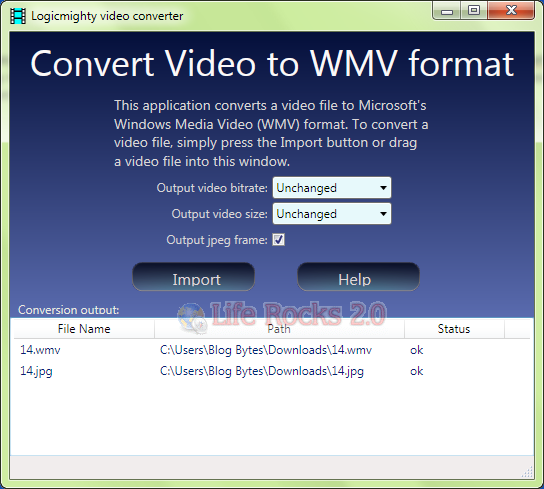
To convert a video file, either press the Import button to locate a video file or drag a video file onto the ConvertToWMV application window. The video processing is done in command prompt. You can select the output video bitrate and also the video size before converting.
To view a converted video, simply double click on the video file name in the “Conversion output” window. A popup media player window will start playing the converted video.
If you check the option “Output jpeg frame” checkbox, it will result in a video frame being captured from the video as a jpeg image. The video frame is captured by default at the 1 second position. This time position can be changed by editing ConvertToWMV.exe.config. By default the converted WMV video has the same bitrate and video frame size as the input video.







Video Converter Platinum is the most advanced total video converter which can convert between any video formats including MPG, MPEG, MPEG2, MP4, H.264, SWF, FLV, VOB, MOD, M4V, AVI, WMV, 3GP, 3GPP, MOV, DivX, XviD, QuickTime Video, DV, MJPG, MJPEG, MPV, etc, along with HD videos, like HD TS, HD MPG, HD MPEG, HD MP4, HD AVI, etc and extract audio from these video. It also converts between all audio formats including MP3, MP2, AAC, AC3, WAV, WMA, M4A, RM, RAM, OGG, AU, AIF, AIFF, APE, FLAC, NUT with excellent conversion speed and quality. Then you can easily full enjoy your portable player.
http://wannasoft.com/4Videosoft-Video-Converter-Platinum/