
Advertisements


Blue Screen of Death (BSOD) is a error screen in Windows, after encountering a critical system error which can cause the system to shut down to prevent damage. You can get details on what caused BSOD on Windows using the free utility BlueScreenView. BlueScreenView scans all your minidump files created during ‘blue screen of death’ crashes, and it displays the information about all crashes in one table. This can be used to analyze the crash cause and prevent future crashes.
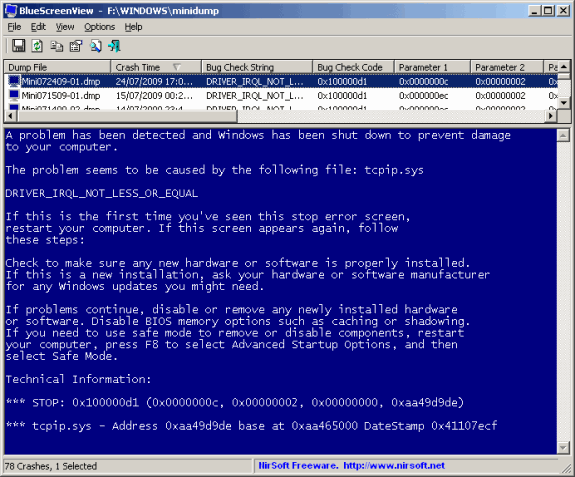
bluescreenview2

Img Credit: Nirsoft

For each crash, BlueScreenView displays the minidump filename, the date/time of the crash, the basic crash information displayed in the blue screen (Bug Check Code and 4 parameters), and the details of the driver or module that possibly caused the crash (filename, product name, file description, and file version).

Features of BlueScreenView;

  • Automatically scans your current minidump folder and displays the list of all crash dumps, including crash dump date/time and crash details.
  • Allows you to view a blue screen which is very similar to the one that Windows displayed during the crash.
  • BlueScreenView enumerates the memory addresses inside the stack of the crash, and find all drivers/modules that might be involved in the crash.
  • BlueScreenView also allows you to work with another instance of Windows, simply by choosing the right minidump folder (In Advanced Options).
  • BlueScreenView automatically locate the drivers appeared in the crash dump, and extract their version resource information, including product name, file version, company, and file description.

This tool does not require any installation and you can directly execute the exe file. You can also customize the screen details by displaying or hiding any particular columns in the application using advanced features.

Note: This application might not show any details if you have cleared the system error reports from minidump folder, alternatively if you have stored it in any other location, you can also provide the path to that folder. We were unable to get a screenshot from Windows 7 as we have not encountered a BSOD.


Download BlueScreenView

Written By Nirmal

Nirmal is a Technology Blogger and a Microsoft MVP in Windows. Nirmal is also the editor-in-chief and owner of Life Rocks 2.0. He can be contacted at nirmal@nirmaltv.com. You can also follow him on Twitter @nirmaltv

SHARE THIS
ARTICLE
digg_32  stumbleupon_32  twitter_32  facebook_32  delicious_32
friendfeed_32  reddit_32  technorati_32  yahoobuzz_32  rss_32

11 Responses to “Get BSOD Crash Information using BlueScreenView”

  1. [...] via Life Rocks 2.0 via LifeHacker] Share and Enjoy: These icons link to social bookmarking sites where readers can [...]

  2. [...] B&#108ueSc&#114eenView is a f&#114ee down&#108oad f&#114om &#78i&#114Soft. &#73f you wou&#108d &#114athe&#114 &#106ust ha&#118e time to w&#114ite down the e&#114&#114o&#114 message whene&#118e&#114 a &#98&#108ue sc&#114een comes up, &#73′&#118e p&#114e&#118ious&#108y w&#114itten an a&#114tic&#108e on how to t&#114oub&#108eshoot the b&#108ue s&#99&#114een of death by p&#114e&#118enting automati&#99 &#114eboot. BlueS&#99reenVie&#119 [NirSoft &#118i&#97 &#76&#105f&#101 R&#111cks 2.0] [...]

  3. [...] BlueScreenView is a free download from NirSoft. If you would rather just have time to write down the error message whenever a blue screen comes up, I’ve previously written an article on how to troubleshoot the blue screen of death by preventing automatic reboot. BlueScreenView [NirSoft via Life Rocks 2.0] [...]

  4. [...] screen of death by preventing automatic reboot. &#66&#108&#117eScreenView [NirSoft via Life Rocks 2.0] Share &#97&#110&#100 [...]

  5. [...] BlueScreenView is a free download from NirSoft. If you would rather just have time to write down the error message whenever a blue screen comes up, I’ve previously written an article on how to troubleshoot the blue screen of death by preventing automatic reboot. BlueScreenView [NirSoft via Life Rocks 2.0] [...]

  6. [...] BlueScreenView is a free download from NirSoft. If you would rather just have time to write down the error message whenever a blue screen comes up, I’ve previously written an article on how to troubleshoot the blue screen of death by preventing automatic reboot. BlueScreenView [NirSoft via Life Rocks 2.0] [...]

  7. [...] BlueScreenView is a free download from NirSoft. If you would rather just have time to write down the error message whenever a blue screen comes up, I’ve previously written an article on how to troubleshoot the blue screen of death by preventing automatic reboot. BlueScreenView [NirSoft via Life Rocks 2.0] [...]

  8. [...] BlueScreenView is a free download from NirSoft. If you would rather just have time to write down the error message whenever a blue screen comes up, I’ve previously written an article on how to troubleshoot the blue screen of death by preventing automatic reboot. BlueScreenView [NirSoft via Life Rocks 2.0] [...]

  9. Blue Screen Error says:

    To get rid of the blue screen of death, you have to update your drivers or install a registry cleaner.

    Hope this helps

    http://bluescreenerror.og

  10. [...] on 01 December 2009 by Nirmal in Windows 7 Advertisements We have covered a free utility to analyze the cause of Blue Screen of Death in Windows. Similar to Blue Screen of Death, Black Screen of [...]

Leave a Reply




