

Windows 7 has a completely new task bar which is also called the Superbar with lot of new features and improvements. You can create a stack of your programs or files which are frequently used with 7Stack. 7stacks is an easy to use, free application that lets Windows 7 (and Vista and XP) users have “stacks” of icons in their Taskbar(in Windows 7) or QuickLaunch Toolbar (in Vista and XP). With 7Stack, you can create a stack of your most frequently opened programs and then use the stack to open these programs.
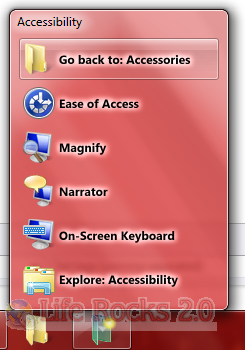
You can also use it to browse and access documents within a folder very quickly. When you want to access frequently used documents, you can create a stack to that document’s folder, and open that document in a couple of clicks.
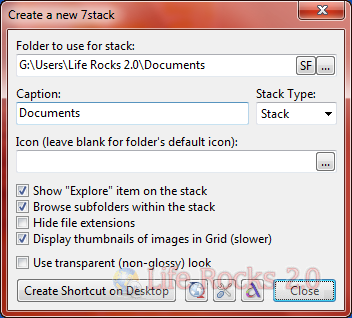
There are various settings that can be chosen for the stack. The stack can be created a stack, grid or even a menu.
Features of Stack:
- In 7 and Vista, 7stacks uses Aero, making the stacks look like part of Windows itself.
- Browse subfolders within a stack.
- 3 different styles of stacks: Normal, Grid, and Menu
- Normal displays a stack of icons vertically, with a text description next to it.
- Grid displays a “squarish” grid of icons only; useful when displaying a large number of items like document folders.
- Menu displays a cascading menu of items, with a very small icon and a name next to it. Hover over subfolders to browse inside those folders.
- In Windows 7, create a new stack by right-clicking on any stack and selecting “Create New Stack” from the JumpList entry.
- In Menu mode, 7stacks doesn’t even need to be in a toolbar. You can use it right from your desktop, or any other folder.
- Pin up to 10 different stacks on the Windows 7 taskbar







I absolutely love this software. It is awesome.
Luv this program.
If it’s not too much trouble can you make it possible to sort the applications in the Grid or Stack by ‘date created’ ort ‘name’.
Thank you!
This is absolutely brilliant!
Now why couldn’t they just have employed you to make this part of Windows 7?
I mean – of course we’re gonna need to stack programs! Nobody uses only 16 programs/locations – that’s all you can fit on the taskbar.
Thanks again, you’ve made my computer life better!
Nice tool, however it doesn’t respect the shortcut’s icon if it’s manually changed.