
Advertisements


Windows has its own build in device manager to install and uninstall drivers for devices or update them with the latest ones. Device Remover is an advanced and powerful Device Manager for Windows which has host of features which are not available in the default device manager for Windows. This powerful device manager is compatible with Windows 2000/XP/Vista/Windows7. It requires Microsoft .Net framework for running and provides command line parameters to control the functioning of devices.
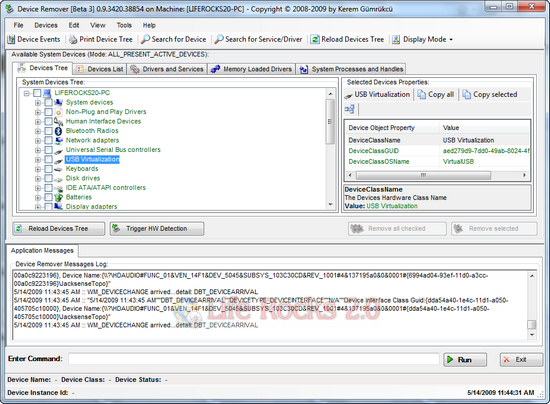
Device Remover

Features of Device Remover:

  • In-Depth view of all installed Devices, Device Classes, Drivers and Services on a Windows System (Hidden, Detached, Current installed, Problematic Devices)
  • Easy mass removal of multiple Devices On-The-Fly
  • Modification/Manipulation of Devices, Drivers and Services on the System
  • Live detailed View of Device Detections on the System
  • Multiple Device Problem solving Features and Functions

The application also has a DeviceRemoverCleanup.exe which can help you to unload the Driver and cleanup possible temporary Data. Overall Device Remover is a good application to manage your device drivers.


Download Device Remover

Written By Nirmal

Nirmal is a Technology Blogger and a Microsoft MVP in Windows. Nirmal is also the editor-in-chief and owner of Life Rocks 2.0. He can be contacted at nirmal@nirmaltv.com. You can also follow him on Twitter @nirmaltv

SHARE THIS
ARTICLE
digg_32  stumbleupon_32  twitter_32  facebook_32  delicious_32
friendfeed_32  reddit_32  technorati_32  yahoobuzz_32  rss_32

9 Responses to “Advanced and Powerful Device Manager for Windows”

  1. [...] Device Remover is a free download for Windows, requires the .NET 3.5 Framework, and should be used with caution—with great power comes great system crashes. If you simply want to backup your drivers, you can use DriverMax or previously mentioned Double Driver to make a copy of your system’s drivers. Device Remover [via Life Rocks 2.0] [...]

  2. [...] Device Remover is a free download for Windows, requires the .NET 3.5 Framework, and should be used with caution—with great power comes great system crashes. If you simply want to backup your drivers, you can use DriverMax or previously mentioned Double Driver to make a copy of your system’s drivers. Device Remover [via Life Rocks 2.0] [...]

  3. [...] Device Remover is a free download for Windows, requires the .NET 3.5 Framework, and should be used with caution—with great power comes great system crashes. If you simply want to backup your drivers, you can use DriverMax or previously mentioned Double Driver to make a copy of your system’s drivers. Device Remover [via Life Rocks 2.0] [...]

  4. [...] Double Driver to mak&#101&#32&#97 copy of your system’s drivers. Device Remover [via Life Rocks 2&#46&#48&#93 Share and [...]

  5. [...] Device Remover is a free download for Windows, requires the .NET 3.5 Framework, and should be used with caution—with great power comes great system crashes. If you simply want to backup your drivers, you can use DriverMax or previously mentioned Double Driver to make a copy of your system’s drivers. Device Remover [via Life Rocks 2.0] [...]

  6. [...] tuyo Si buscas un desinstalador de dispositivos de Hardware que sea seguro y efectivo, en Life Rocks 2.0 encontré Device Remover que es una utilidad que elimina al 100% los dispositivos, ya que el [...]

  7. Pallab says:

    Nice find Nirmal.

Leave a Reply




