

Whenever we listen to songs in Windows media player or iTunes, it would be a great idea to have the lyrics of song available while it is being played. LyricsFetcher is a simple and freeware utility which can get the lyrics for all the songs within your iTunes or Windows Media Player library. When you first run LyricsFetcher, it will read songs from your iTunes library (if iTunes is not installed, it will read your Windows Media Player library). This initial reading may take quite a few seconds. Once this process is complete, you will be able to get the lyrics online using this application.
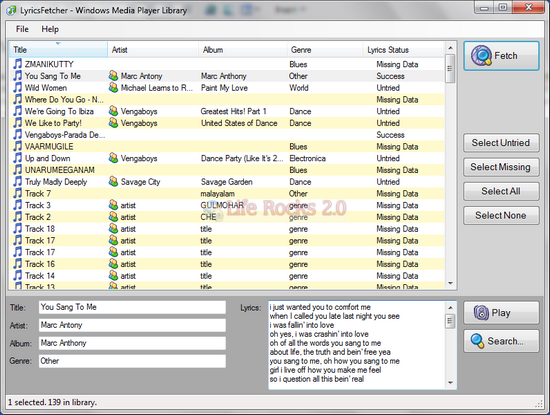
Once the songs are loaded, you select the songs for which you want to find lyrics and then click Fetch . LyricsFetcher will then look on the web for lyrics for the selected songs. If it finds some, it will write them into your music library, otherwise it will mark the song has having failed to find lyrics.
Whenever you have updated your music library, you can also update LyricsFetcher using the menu options. Generally fetching lyrics of a song will take around one second or so, but if you have a large collection in your music library, it might take some time to fetch for every song.
When the fetching process is finished, all lyrics found will have been written into your music library, and can now be used from there. If you have an iPod, hook it up, sync it, and all your songs will have lyrics.








If you are on Linux, use Amarok for this – its a music player with Lyrics fetching capability(via plugin installed by default)
Don’t download this, it’s a waste of time, and it doesn’t work. ><
o it works….got lyrics for about 95% of my songs…only took about 10 mins to do 500 songs
Wouldn’t say this is worth it; it fetched about 1900 songs worth of lyrics for me, before listing the rest of them as ‘untried.’ When I went to find lyrics for the untried ones, it just gives me a link to lyrics vip for the rest of the songs in the lyrics section, which is annoying.
It seems it has stopped working since iTunes 10.
@OGeon
Yeah, and too bad.
I loved this thing when it worked. I wonder what happened.