Daisy Consortium and Microsoft has launched a new add-in for Word which will help you to convert word document to MP3 format. The “Save as DAISY” add-in for Microsoft Office Word now incorporates a Lite version of the DAISY Pipeline. With this add-in, you can select to generate the DAISY XML for further processing, or you can generate a fully conforming DAISY file set with full navigation and full text synchronized with audio.

The audio is generated by the default text-to-speech (TTS) engine on your Windows computer. DAISY Translator v2 makes use of LAME MP3 encoding technology. The software will automatically detect the version of Microsoft Office Word used and install the appropriate add-in for word. Once installed, you can access the features from the office button on the top left hand corner.
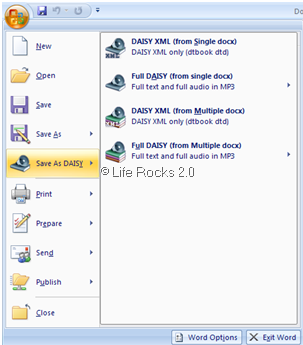
Now you can save document in MP3 format using this add-in. Microsoft Word add-in Daisy, works with Word XP, Word 2003, and Word 2007.
Download Daisy Translator Add-in for Word