

Some PDF to Word Converter is a free application which can convert PDF to word doc and PDF to rtf, so you can edit and reuse your PDF content. Using Some PDF to Word Converter you can preserve original layout, text, images, vector drawings of your PDF file. The interface is basic and uncluttered and has user options available in a sidebar on the right. It handles batch conversions, converts outer fonts into text and embedded fonts into images, and supports both all pages and page-range specific conversions.
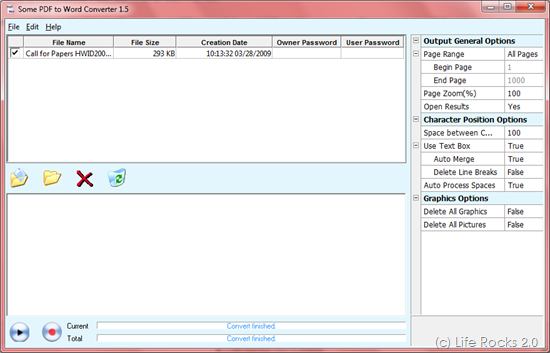
Features of Some PDF to Word Converter;
- Convert PDF files into Microsoft Word documents.
- Do not need Adobe software support.
- Accurately preserves Text, Tables, Graphics & Layout.
- Supports PDF1.6 protocol.
- Supports batch conversion.
- Automatically resize PDF page to fit your required Word page size.
- Batch PDF to Word conversion – convert multiple documents at once.
- Convert outer fonts into text and embedded fonts into images.
- Automatically links page numbers to all generated pages.
- Support page range conversion (all, from-to, individual pages).
- Support deletion of graphics and pictures from the generated Word document.
- Support encrypted PDF file.
Download Some PDF to Word Converter








You might like to try our new free ‘PDF to Word’ service too — http://www.pdftoword.com.
you can try this–Tweak pdf to word 3.0
it allows you to convert a lot of pdf files at the same time.
and only cost $19.95.
and it is free to try.
have a look at http://www.tweakpdf.com
Here is free PDF tool which I would like to share that is Free PDF cube.
This tool is much faster, better and has lot of functions. Also this free for life
You can try the same from pdfcube.com
The Direct Download link for FREE PDF is
http://pdfcube.com/download/pdf-cube-free.zip
It is 100% FREE PDF Converter and works as a virtual printer. you can convert more than 300 + formats so now you can convert all your Word, Excel, Powerpoint to PDF Free.