

RichCopy is a free utility developed by Microsoft for copying multiple files in Windows and features pause and resume support for copying files. Previously this tool was available as internal utility for Microsoft and now released for public download. RichCopy can be described as a multithreaded copying tool.
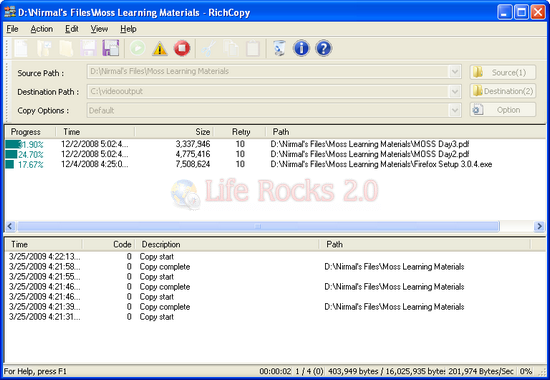
Rather than copying one file at a time in serial order, which is normally followed, RichCopy can open multiple threads simultaneously, allowing many files to be copied in parallel and cutting the total time required to complete the operation several times over.
RichCopy is designed to help people who need to copy large number of files between storage devices directly or indirectly over the network by accelerating copy performance and shorten the time people has to spend for file copy operation.
Features of RichCopy;
- RichCopy 4.0 is one of the fastest copy tool for Windows
- Copy files from multiple sources
- Increased supported copy threads
- RichCopy 4.0 can filter files and directories with any date/time stamp with ‘earlier” and ‘later’
- Full command line support
- Optimized copy method
You can also pause and resume file copy operations, so if you lose network connectivity at any point, you can just pick up where you left off. RichCopy is a handy tool for Windows users.








May be I am wrong , but i have heard that copying multiple files simultaneously from different locations on a Hard Disk, can result in bad sectors.
@Kanak,
I’m not sure of that issue, but since this tool is from Microsoft we can say it should be the best one for this purpose 🙂
I use TeraCopy http://www.codesector.com/teracopy.php instead.
It’s quite faster than RichCopy IMO
@kanak,
from vista onwards….defrag is automatically done, so bad sectors should not be a problem…
@nirmal,
Have you used this tool? I sometimes find that copy pasting multiple files from the USB results in slow down of all the copy paste tasks….will this solve it?
@TheAnand,
I have used this and it did look very fast in copying.
omg this is taking day after day after day. What is your definition of “pause and resume”? It doesn’t seem to let me to a reboot since I have no memory left.