
Advertisements


If you are still using Windows XP, but need the looks of Windows 7 on your XP, then Seven Remix XP might be of help. Seven Remix XP is an application which was designed to improve the GUI of Windows XP. The installer will replace the resources of your system files. Files that contain icons, images, animations that are extracted from Windows 7, so that your XP will have the look and feel of Windows 7.
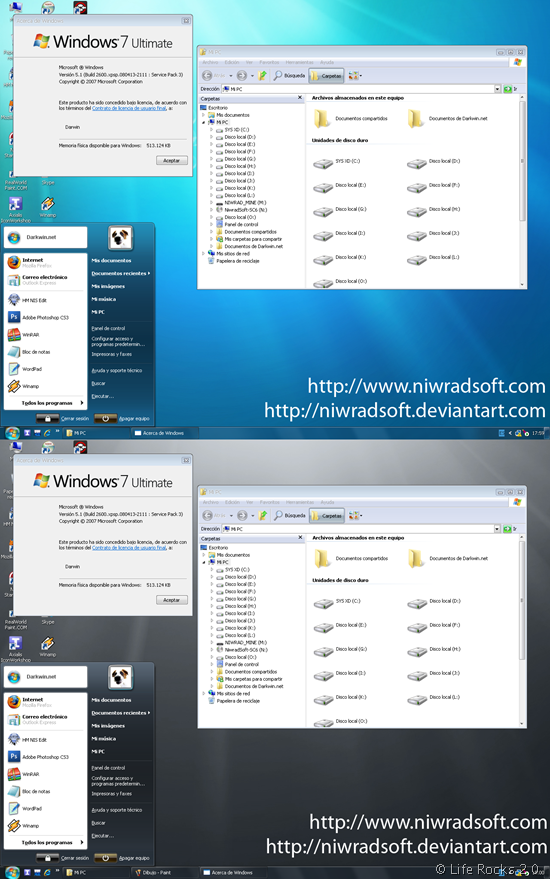
Seven_Remix_XP

This installer is designed to work on the following operating systems and languages:

  • Windows XP (Home, Pro, RTM, SP1, SP2, SP3, Corporate)
  • Windows 2003 (Standard, Enterprise, Datacenter, Web, RTM, SP1)
  • Windows Media Center Edition (2003, 2004, 2005)
  • Windows XP Tablet PC Edition
  • All Language Versions
  • Does NOT work with 64 bit versions of Windows

The installer automates the process of substitution of system files. It makes changes to the registry and installs skins and visual extras like sounds, styles, etc. In addition, it makes a backup of its archives in case that it needs to recover them. You can uninstall the pack anytime you don’t need it.


Download Seven Remix XP

Written By Nirmal

Nirmal is a Technology Blogger and a Microsoft MVP in Windows. Nirmal is also the editor-in-chief and owner of Life Rocks 2.0. He can be contacted at nirmal@nirmaltv.com. You can also follow him on Twitter @nirmaltv

SHARE THIS
ARTICLE
digg_32  stumbleupon_32  twitter_32  facebook_32  delicious_32
friendfeed_32  reddit_32  technorati_32  yahoobuzz_32  rss_32

43 Responses to “Transform Windows XP to Windows 7 with Seven Remix XP”

  1. [...] Nirmaltv ADVERTISEMENTS Search On Blogsdna @import [...]

  2. [...] via|Life Rocks 2.0 Condividi Aggiungi su OkNotizie [...]

  3. KingofSwing says:

    That’s Nice i was looking for it :-)

  4. Thanks. Really we can now experience some 7 visuals on Xp.

  5. [...] Seven Remix XP [via Life Rocks] Tags: Enhancements, windows 7, Windows Tips, windows xp Save as PDFPrint [...]

  6. phaoloo says:

    Really nice, I should download and try it.

  7. [...] [Via] heyos_ad_user = 8808; heyos_ad_type = “G”; heyos_ad_format = “1″; heyos_color_border = “5BBF00″; heyos_color_bg = “F5FFEC”; heyos_color_link = “005B88″; heyos_color_text = “000000″; heyos_color_url = “0033FF”; Post similiWindows 7: Disponibile la Patch grafica Rilasciato il Download Ufficiale di Windows 740 Sets di Icone GratuiteElisa, Ottimo Media Center GratuitoGestisci le Tue Liste di Cose da Fare con WishList Scrivi un commento [...]

  8. [...] Download : Download Seven Remix XP Via [Nirmaltv] [...]

  9. [...] 7 transformation with the very useful Windows 7 shortcut keys application. Seven Remix XP [via Life Rocks 2.0] Tags: picture, tip, [...]

  10. [...] NiwradSoft Seven Remix XP is a free download for Windows XP users. If you want to add Windows 7 features to your XP desktop, check out previously mentioned Aero Shake, Aero Snap and Aero Peek utilities—then finish up the Windows 7 transformation with the very useful Windows 7 shortcut keys application. Seven Remix XP [via Life Rocks 2.0] [...]

  11. [...] Windows XP only: The system theme pack installer from NiwradSoft gives your crayola-inspired Windows XP desktop an impressive Windows 7-ish look—without wasting time hacking system files yourself. Installing the theme pack is as simple as clicking through the installer, though you may want to take your time and choose exactly which components to install—by default the package includes boot screens, logon screens, screensaver, system theme, and a ton of hacked resource files. Once you’ve installed and rebooted, you’ll be greeted with a Windows 7 style desktop, complete with the fish wallpaper from the last beta. NiwradSoft Seven Remix XP is a free download for Windows XP users. If you want to add Windows 7 features to your XP desktop, check out previously mentioned Aero Shake, Aero Snap and Aero Peek utilities—then finish up the Windows 7 transformation with the very useful Windows 7 shortcut keys application. Seven Remix XP [via Life Rocks 2.0] [...]

  12. [...] To Windows 7 Transformation Pack ( Via NirmalTV [...]

  13. [...] NiwradSoft Seven Remix XP is a free download for Windows XP users. If you want to add Windows 7 features to your XP desktop, check out previously mentioned Aero Shake, Aero Snap and Aero Peek utilities—then finish up the Windows 7 transformation with the very useful Windows 7 shortcut keys application. Seven Remix XP [via Life Rocks 2.0] [...]

  14. neil says:

    Don’t download and install this software……….my OS cracks down….needs to be reformated……….so bad……..

  15. [...] Windows 7 theme [via nirmaltv] Possibly related posts: (automatically generated)a history of microsoft operating [...]

  16. [...] Download Seven Remix XP Source: Windows 7 Transformation Pack for Windows XP. [...]

  17. [...] If you fancy the real deal, you can always install Windows 7 onto your computer here, but you will need utorrent which can be found here to download torrents. Good luck and have fun tricking your friends and family with these applications. Windows 7 theme [via nirmaltv] [...]

  18. [...] Remix XP [via Life Rocks 2.0] Tags: Aero Peek, Theme, Windows 7, Windows Aero, Windows XP SHARETHIS.addEntry({ title: “Make [...]

  19. Savage Henry says:

    works fine for me

  20. nad says:

    why? that is something wrong with this software? i need to know it..

  21. Arsal says:

    hey thanks buddy i need that now we can experience windows se7ven hurryy

  22. Seth says:

    Does this not work with Windows SP 3? I just installed SP3 on my computer then reset, now I’m back to the old XP task bar.

  23. [...] can convert your XP based PC to the look and feel of Windows 7. Previously we had covered about Seven Remix XP, another transformation pack which was designed to improve the GUI of Windows XP. The Seven [...]

  24. [...] can convert your XP based PC to the look and feel of Windows 7. Previously we had covered about Seven Remix XP, another transformation pack which was designed to improve the GUI of Windows XP. The Seven [...]

  25. Arindam Biswas says:

    This is nice.But difficult to find exe………….

  26. LOL phaoloo !! says:

    ROFL phaoloo .
    it works on my pc.
    ur pc juz suxx :(

  27. it is very good but it is very difficult to find any

  28. really it is very good

  29. Christopher says:

    why … .tell me why … why does not support 64 bits of windows… kinda sad …

  30. silvan says:

    hi after i transform xp to windows 7 if i want to make xp on my pc what i need to do ?i need
    the xp cd ?cause i have a acer laptop and i dont have a xp cd!!!

  31. ogaze says:

    i did install windows 7 on my pc but it makes the system slow
    is going be the same with the transformation pack

  32. lokesh says:

    it makes my pc slow. why is that.

  33. Ankit says:

    Free Download.

  34. [...] this site : Windows 7 Transformation Pack for Windows XP __________________ Watch Out Digital Point MOD team, they scam my money and BAN [...]

  35. [...] Daca vrei sa ramai fidel XPului ( cel putin momentan), restilizeaza-l pentru a arata ca Windows 7: Link [...]

  36. kumar says:

    ya like this

  37. [...] does not require any hacking or manual editing of registry files. Just download and install [via] the theme pack and you are good to go. Resultant interface is very neat and stylish – you for [...]

Leave a Reply




