
Advertisements
SetteMaxer is a free tool to optimize few tasks for Windows 7 which otherwise would need to tweak the registry. SetteMaxer is not a full fledged tweaking utility for Windows 7, but contains a set of 12 tweaks for Windows 7 which could solve some of the problems encountered. Like Windows 7, this application is also in beta stage, so use it at your own risk. If you are not able to run this program, try executing as administrator.
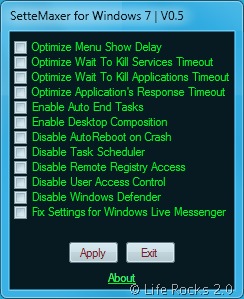
Features of SetteMaxer;
- Optimizes the menu show delay: Sets delay value of menus to 0 in order to have OS navigation faster.
- Optimizes Wait to Kill Services Timeout: Sets its value to 1000 in order to shorten shutdown/restart duration.
- Optimizes Wait to Kill Applications Timeout: Sets its value to 1000 in order to shorten shutdown/restart duration.
- Optimize Application Response Timeout: Shorten Application tmeout when an application is not responding in order to restart or end it faster.
- Enable Auto End Tasks: Enables closing the applications all together when shutdown/logoff/restart signal has been sent.
- Enable Desktop Composition: Enables Windows Aero interface even Windows Experience Index could not be started/completed or probably is not enough to enable it.
- Disable AutoReboot on Crash
- Disable Task Scheduler
- Disable Remote Registry Access: It can be useful to protect the registry disabling of remote access if it is not needed to use.
- Disable User Access Control: Although this can be done from the control panel, people who are not comfortable with it can easily do it here.
- Disable Windows Defender: Disables Windows Defender if you prefer not to use it.
- Fix Settings for Windows Live Messenger: For WLM 8.5, it may resolve some login problems on proxy server.


[...] The screenshot above is exactly what SetteMaxer is—just a handful of check boxes and an “Apply” button. It’s definitely worth reading at the project page below what specifically each feature does when applied, though most are familiar fixes like User Account Control/Defender disablers, menu speed options, and program crash controls. If you see anything worth enacting in the list above, grab the executable, run it, apply the change, and you can delete it if you want, as SetteMaxer is a stand-alone file. It’s a free download for Windows 7 beta systems only. SetteMaxer for Windows 7 [via Life Rocks 2.0] [...]
[...] If you see anything worth enacting in the list above, grab the executable, run it, apply the change, and you can delete it if you want, as SetteMaxer is a stand-alone file. It’s a free download for Windows 7 beta systems only. SetteMaxer for Windows 7 [via Life Rocks 2.0] [...]
[...] Via LifeRocks 2.0 [...]
[...] If you see anything worth enacting in the list above, grab the executable, run it, apply the change, and you can delete it if you want, as SetteMaxer is a stand-alone file. It’s a free download for Windows 7 beta systems only. SetteMaxer for Windows 7 [via Life Rocks 2.0] [...]
[...] file. It’s a free download for Windows 7 beta systems only. SetteMaxer for Windows 7 [via Life Rocks 2.0] No comments for this entry [...]
[...] en LifeRocks Comparteme These icons link to social bookmarking sites where readers can share and discover new [...]
[...] puede editar desde el registro de Windows, esta utilidad se llama SetteMaxer que conocí gracias a Life Rocks 2.0 y la cual te permite acceder y cambiar facilmente estas opciones desde una misma ventana y con unos [...]
[...] puede editar desde el registro de Windows, esta utilidad se llama SetteMaxer que conocí gracias a Life Rocks 2.0 y la cual te permite acceder y cambiar facilmente estas opciones desde una misma ventana y jailbird [...]
Hi,
SetteMaxer has been updated to V1
http://settemaxer.turkiye.it
Regards
Tevfik Binen
Thanx, nice tips to optimize windows 7






