

JDiskReport is a free application which enables you to find out how much space the files and directories consume on your disk drives, and it helps you find obsolete files and folders. This utility analyzes your hard disk and collects disk usage statistics which are displayed in the form of charts and diagrams. JDiskReport provides different perspectives about your disk drives: absolute and relative sizes, size distribution, distribution of modification dates, and distribution of types.
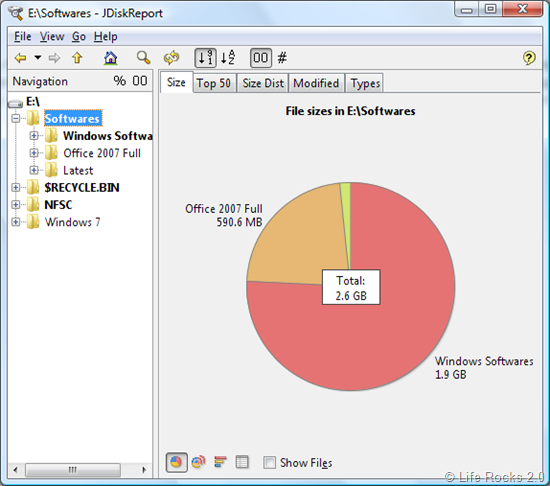
Each disk drive selected for analysis, the size distribution is shown in different charts. On the top portion of the chart, you can see different perspectives of the drive selected. You can select the Top 50 tab which shows the list of top 50 files based on the size. The Size Distribution tab shows the distribution of files in the drive based on the size.
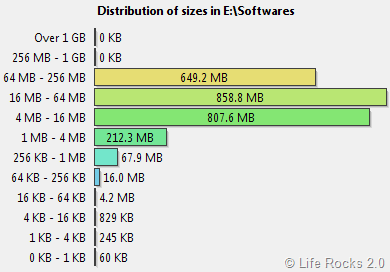
Apart from this there is also modified distribution of files according to date and finally there is the distribution of files based on the type of files in the drive.
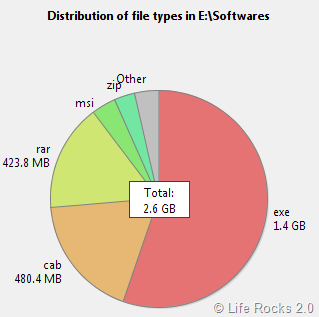
You can select three different chart types and this can be toggled at the bottom portion of the report. The report can also be generated based on the number of files available in each folder. This report is similar to the file size report.
JDiskReport is an excellent utility to analyze hard disk and it comes completely free of cost. It requires Java to be installed for proper functioning. This utility is available for Windows and Mac.







