

Process monitor for Windows is a freeware application to control tasks running in Windows. With the normal task manager, we can monitor processes or kill programs which are not responding, but with Process monitor, the job is much more simpler. Process Manager is an application which allows users to mange their processes fast and easy. Process Manager is comparable with Windows Task Manager and it does the job in fewer clicks than Task Manager.
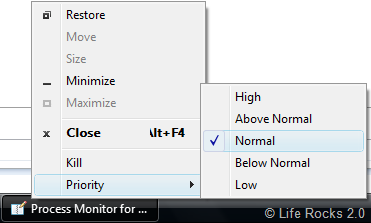
Once the Process Explorer is running, it will be available in the system tray. If you want to kill any running process or change the priority of task, right click on the program in the taskbar and then change the priority or kill the process.
This application takes lesser number of clicks for managing a task when compared to Task Manager. Once installed the program adds two new entries to the right click menu of the taskbar- Kill and priority.








Hi Nirmal,
New version of This software is released, would request you to write an review on that when you get time.
-Arif